
Acer Aspire 3 Spin 14
This affordable convertible laptop offers flexible 2-in-1 functionality and adequate performance for basic tasks, but dim display and limited processing power restrict its appeal to light users only.
Updated January 28, 2026
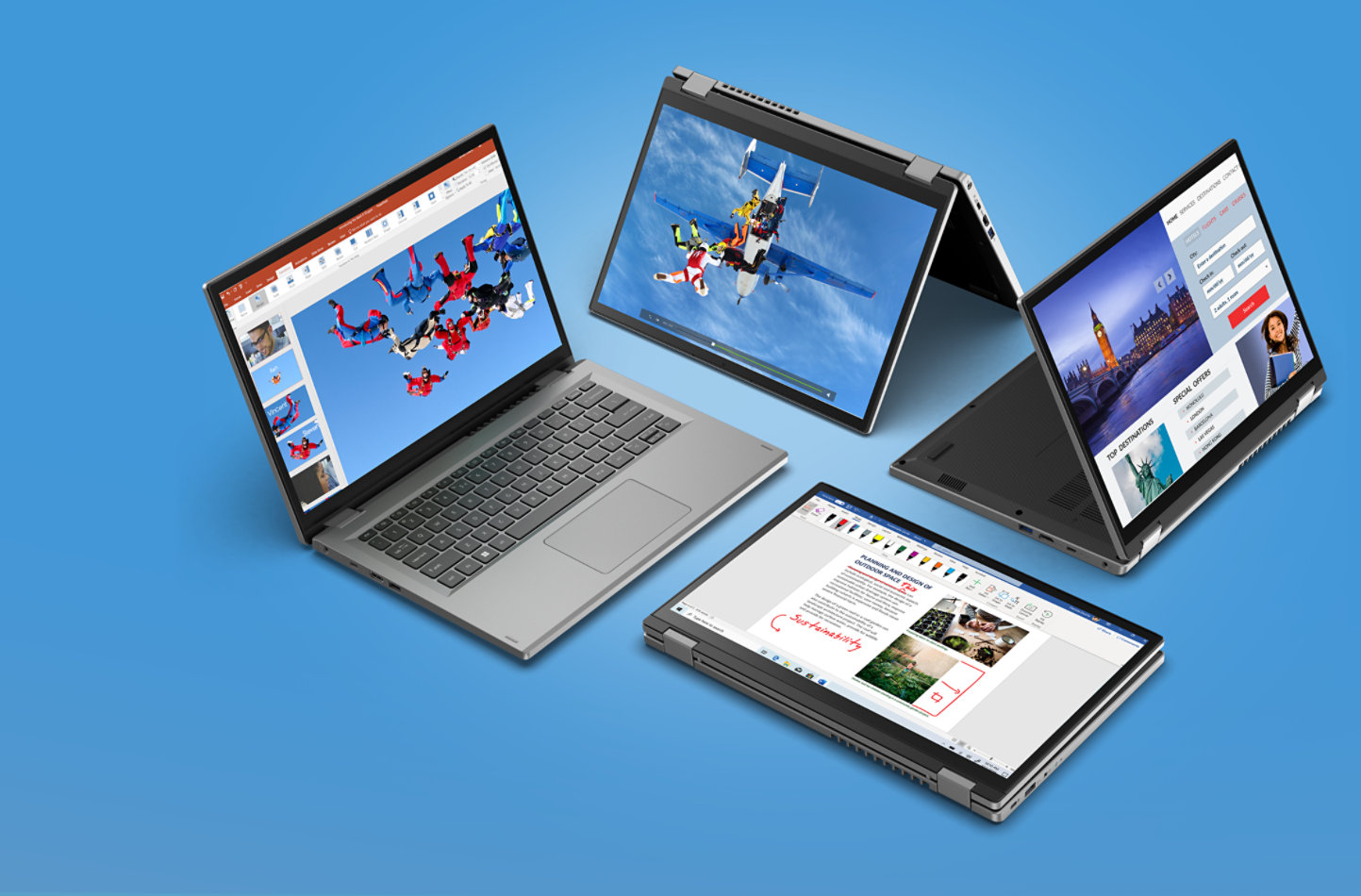
The Acer Aspire 3 Spin 14 positions itself as an entry-level 2-in-1 convertible laptop targeting students and casual users seeking versatility without breaking the budget. Powered by Intel's low-power Alder Lake N-series processors - including the N100, N200, or Core i3-N305 - this 14-inch touchscreen laptop transforms between laptop, tent, and tablet modes. The device features a WUXGA (1920x1200) IPS touchscreen display with a productivity-friendly 16:10 aspect ratio, 8GB LPDDR5 RAM, and up to 512GB PCIe NVMe SSD storage. While its compact 1.54kg design enhances portability and the wide port selection adds practical connectivity, the laptop struggles with a dim, washed-out display that covers only 45% NTSC color gamut, and battery life that falls short of advertised claims. The Aspire 3 Spin 14 handles basic productivity tasks like web browsing, document editing, and video streaming adequately, but its efficiency-core-only CPU architecture and integrated UHD Graphics make it unsuitable for demanding applications, content creation, or gaming.[1][2][3]
Pros
- Convertible 2-in-1 design with 360-degree hinge allows flexible use in laptop, tent, or tablet mode for varied consumption and productivity scenarios
- Lightweight and portable at just 1.54kg with compact 14-inch footprint makes it easy to transport for students and mobile workers
- User-replaceable M.2 2280 PCIe Gen 4 SSD provides upgrade flexibility and fast storage performance for quick boot times and file transfers
- Wide port selection includes two USB-A 3.2 Gen 1 ports, one USB-C 3.2 Gen 2 with DisplayPort and charging support, HDMI output, and 3.5mm audio jack
- Reasonable build quality for the price with a solid plastic chassis that feels durable for budget-conscious buyers
Cons
- Dim display with maximum brightness insufficient for well-lit environments or outdoor use, and washed-out colors due to narrow 45% NTSC color gamut
- Limited processing power from efficiency-core-only Intel N-series processors restricts performance to basic tasks and causes slowdowns with demanding workloads
- Soldered RAM capped at 8GB with no upgrade path limits multitasking capabilities and future-proofs poorly
- Battery life falls short of advertised 10-hour claims, delivering only 4-6 hours in real-world use for productivity and approximately 5 hours for video playback
- Small touchpad can make navigation, dragging, and gestures challenging during extended use sessions
The Acer Aspire 3 Spin 14 positions itself as an entry-level 2-in-1 convertible laptop targeting students and casual users seeking versatility without breaking the budget. Powered by Intel's low-power Alder Lake N-series processors - including the N100, N200, or Core i3-N305 - this 14-inch touchscreen laptop transforms between laptop, tent, and tablet modes. The device features a WUXGA (1920x1200) IPS touchscreen display with a productivity-friendly 16:10 aspect ratio, 8GB LPDDR5 RAM, and up to 512GB PCIe NVMe SSD storage. While its compact 1.54kg design enhances portability and the wide port selection adds practical connectivity, the laptop struggles with a dim, washed-out display that covers only 45% NTSC color gamut, and battery life that falls short of advertised claims. The Aspire 3 Spin 14 handles basic productivity tasks like web browsing, document editing, and video streaming adequately, but its efficiency-core-only CPU architecture and integrated UHD Graphics make it unsuitable for demanding applications, content creation, or gaming.[1][2][3]
Design and Build Quality
The Acer Aspire 3 Spin 14 presents a utilitarian design approach that prioritizes function over aesthetic flourish. The silver plastic chassis features sharp corners and straightforward lines, delivering a professional appearance without premium materials. At 1.54 kg and 18.9mm thick, the laptop achieves genuine portability that makes it practical for daily commuting or travel. The 360-degree hinge mechanism enables four distinct usage modes, allowing smooth transitions between traditional laptop orientation, tent mode for media viewing, stand mode for presentations, and full tablet configuration. While the hinges provide adequate stability across these positions, they exhibit minor wobble during aggressive typing and require two hands to open the lid. The bezels surrounding the 14-inch display measure notably thick by contemporary standards, contributing to a somewhat dated visual profile.[3][4][2][1]
Serviceability receives mixed marks from teardown analysis. Accessing internal components requires removing ten Phillips screws and carefully prying apart plastic clips that demonstrate fragility under excessive force. Once inside, users find the storage drive readily replaceable with support for standard M.2 2280 PCIe Gen 4 SSDs, providing a straightforward upgrade path as capacity needs expand. The 8GB of LPDDR5 RAM remains permanently soldered to the motherboard, eliminating future memory expansion options. This limitation proves particularly constraining given that 8GB represents the maximum configuration available across all model variants.[2][1]
Performance in Real Use
The Intel Core i3-N305 processor defines the performance envelope for top-specification models, delivering adequate capability for fundamental computing tasks. This Alder Lake-N series chip features eight efficiency cores operating at 1.8 GHz base frequency with boost capability to 3.8 GHz. The architecture omits performance cores entirely, resulting in competent multi-threaded performance for basic productivity while struggling with single-threaded workloads that benefit from higher clock speeds. Web browsing, document editing, email management, and video streaming operate smoothly under typical conditions. The system begins showing strain when users attempt moderate multitasking scenarios involving multiple browser tabs, simultaneous application usage, or background processes.[4][2][1]
Benchmark testing reveals limitations that matter for demanding workflows. Geekbench 5 scores position the i3-N305 substantially below mainstream laptop processors featuring P-cores, with single-thread performance proving particularly weak. The integrated Intel UHD Graphics handles desktop compositing and video playback without issue but lacks the processing power for creative applications, programming environments, or any gaming beyond casual browser titles. Blender rendering tests demonstrate impractical completion times, while attempts to run contemporary games like Counter-Strike 2 or Shadow of the Tomb Raider produce unplayable framerates even at lowest settings. Users considering lower-tier configurations featuring Intel N100 or N200 processors should expect noticeably inferior performance due to those chips' reduction to just four cores.[1]
Ease of Use
The typing experience lands in functional territory without inspiring enthusiasm. The island-style keyboard provides reasonably spacious key layout with adequate travel distance, though the slightly textured keycap surface creates an unexpectedly slippery feel that affects typing confidence. Key stability proves acceptable, and the overall layout avoids cramped spacing that plagues some compact laptops. The absence of keyboard backlighting on standard configurations limits usability in dim environments, though some variants offer this feature as an upgrade. The centered touchpad measures notably small relative to competitive devices, creating challenges for dragging operations across long distances and making multi-finger gestures less comfortable. Tracking accuracy performs adequately in the touchpad's center region, but responsiveness degrades noticeably near the edges. Palm rejection works effectively to prevent unintended cursor movement during typing.[3][2][1]
The 14-inch touchscreen employs IPS technology delivering WUXGA resolution at 1920 x 1200 pixels. The 16:10 aspect ratio provides moderately more vertical space compared to traditional 16:9 panels, reducing scrolling requirements when reading documents or browsing websites. Touch response registers inputs reliably, making finger navigation and gesture controls practical in tablet mode. The critical weakness emerges from brightness limitations, with maximum output insufficient to overcome glare in well-lit rooms or outdoor settings. The glossy screen finish reflects ambient light sources prominently, compounding visibility challenges. Color reproduction suffers from narrow gamut coverage at just 45% NTSC, causing images and video to appear noticeably washed out compared to displays with fuller sRGB coverage. Out-of-box color accuracy tests poorly, with significant deviations affecting both color targets and white balance.[5][4][2][1]
Reliability
Thermal management succeeds in maintaining comfortable operating temperatures and noise levels. The cooling system keeps keyboard surface temperatures modest during idle use and only reaches mildly warm levels under sustained load. Fan noise remains audible when the processor operates at full capacity but stays within reasonable bounds that avoid disruption during video calls or quiet environments. Importantly, performance testing reveals no thermal throttling over extended processing sessions, indicating the cooling solution adequately handles the modest heat output from the low-power Intel N-series processor.[1]
Battery endurance presents a mixed picture depending on usage patterns. Acer's official specifications claim up to 10 hours from the 40 Wh battery pack, but real-world results fall substantially short of this marketing figure. Light productivity workloads involving web browsing and document editing yield approximately 6-7 hours of runtime, requiring a charging break to complete a full eight-hour workday. More demanding usage including video streaming reduces endurance to roughly 4-5 hours. The USB-C port supports charging functionality, allowing compatible power adapters to replenish the battery. Charging speed proves reasonably quick, minimizing downtime when users need to top up during the day.[6][2][1]
Use Cases
The Aspire 3 Spin 14 finds its natural audience among students and home users with modest computing requirements. High school and college students pursuing liberal arts coursework benefit from the convertible form factor when taking digital notes in tablet mode, then switching to laptop orientation for essay composition. The combination of adequate processing power for research, writing, and presentation creation alongside budget-friendly pricing aligns well with educational computing needs. Remote workers handling email correspondence, video conferencing, and basic spreadsheet tasks find sufficient capability, provided they maintain realistic expectations about performance limits.[7][5][4][1]
Media consumption represents another suitable application, albeit with caveats. The tent and tablet modes provide comfortable viewing angles for streaming video content on platforms like Netflix or YouTube. The 16:10 display aspect ratio suits video content reasonably well, and the 1920 x 1200 resolution delivers sharp image clarity. However, the dim, washed-out panel quality diminishes the viewing experience compared to devices with brighter, more vibrant displays. The speakers achieve high volume levels but produce thin, tinny audio lacking any bass presence, making external speakers or headphones preferable for extended media sessions.[1]
The laptop proves fundamentally unsuitable for professional creative workflows, software development, or gaming. Photographers and video editors require accurate color reproduction that this 45% NTSC panel cannot provide. Programmers working with integrated development environments and compilation tasks need processing power beyond what the efficiency-core-only i3-N305 delivers. Gamers receive no viable option here, as even lightweight titles struggle to maintain playable framerates.[1]
Long-Term Ownership Feedback
Consumer reports from extended use periods reveal both satisfaction and frustration. Owners who purchased the device understanding its budget positioning generally express contentment with value received relative to price paid. One user noted maintaining the laptop for over a year without reliability issues, praising its durability and describing it as "great computer for its low cost". The ability to upgrade storage provides future-proofing that users appreciate as file collections expand.[5][4][1]
Display quality emerges as the most consistent complaint in long-term user feedback. Multiple owners describe the screen as substandard, with specific criticism directed at light bleed visible around panel edges. One particularly harsh assessment characterized the display as "garbage" with "lights on edges of screen" that "shouldn't be there". These complaints align with professional review findings about brightness limitations and washed-out color presentation. The lack of keyboard backlighting receives mention as a practical shortcoming during evening usage. Battery life that fails to meet marketing claims generates disappointment, particularly among users who expected true all-day mobility.[6][4][5][2][1]
Windows 11 in S Mode, which ships on certain configurations, presents an adaptation challenge. This restricted operating mode limits software installation to applications available through the Microsoft Store, frustrating users who need traditional desktop programs. While users can permanently exit S Mode at no cost, the irreversible nature of this change requires careful consideration. The laptop comes loaded with numerous pre-installed applications including games, trial software, and manufacturer utilities that consume storage space and require manual removal for users preferring a cleaner system.[4][1]
| Specification | Details |
|---|---|
| Processor | Intel Core i3-N305 (8-core, 1.8GHz base, up to 3.8GHz boost) / Intel N200 / Intel N100 [2] |
| Graphics | Intel UHD Graphics (integrated, shared memory) [2][3] |
| RAM | 8GB LPDDR5 (soldered, non-upgradeable) [2][3] |
| Storage | Up to 512GB PCIe NVMe M.2 SSD (user-replaceable) [2][1] |
| Display | 14" WUXGA (1920x1200) IPS touchscreen, 60Hz, 45% NTSC color gamut, 16:10 aspect ratio [2][3] |
| Battery | 40Wh Lithium Polymer, up to 6 hours real-world use [2][6] |
| Connectivity | Wi-Fi 6 (802.11ax), Bluetooth 5.1+ [2][3] |
| Ports | 2x USB-A 3.2 Gen 1, 1x USB-C 3.2 Gen 2 (DisplayPort/charging), 1x HDMI, 3.5mm audio jack [2][3] |
| Webcam | 720p HD camera with dual microphones [2][1] |
| Audio | Dual speakers (2W each) [2] |
| Keyboard | Island-style, no backlight (backlight optional on select models) [2][1] |
| Dimensions | 319.8mm x 227.9mm x 18.9mm [2][3] |
| Weight | 1.54kg (3.4 lbs) [2][3] |
| Operating System | Windows 11 Home (some models ship in S Mode) [2][1] |
| Security | Kensington lock slot, BIOS passwords [2][3] |
| Material | Silver plastic chassis [2][1] |
Buy
- You need an affordable 2-in-1 convertible for basic productivity tasks like web browsing, document editing, and media consumption[4][1]
- Portability is a priority and you require a lightweight laptop under 3.5 pounds for frequent travel or daily commutes[2][1]
- You value flexibility in form factor and want to use your laptop as a tablet for content consumption or note-taking[4][1]
- Your budget is limited and you prioritize getting convertible functionality over raw performance[5][4]
- You need adequate connectivity options with multiple USB ports, HDMI, and USB-C for various peripherals and displays[2][1]
Skip
- You require a laptop for demanding workloads like programming, video editing, 3D modeling, or content creation[1]
- Display quality is important for your work and you need accurate colors or higher brightness for outdoor or well-lit environment use[1]
- Battery life throughout a full workday or school day without charging is essential[6][1]
- You need more than 8GB RAM for heavy multitasking or future software requirements[1]
- Gaming or graphics-intensive applications are part of your intended use case[1]
Critic Reviews
No reviews yet.
User Reviews
No reviews yet.