
Acer Predator Helios Neo 16 AI
A competitively priced gaming laptop that delivers impressive frame rates and a stunning OLED display, though thermal throttling and loud fans reveal the compromises behind its slim profile and aggressive pricing.
Updated January 28, 2026
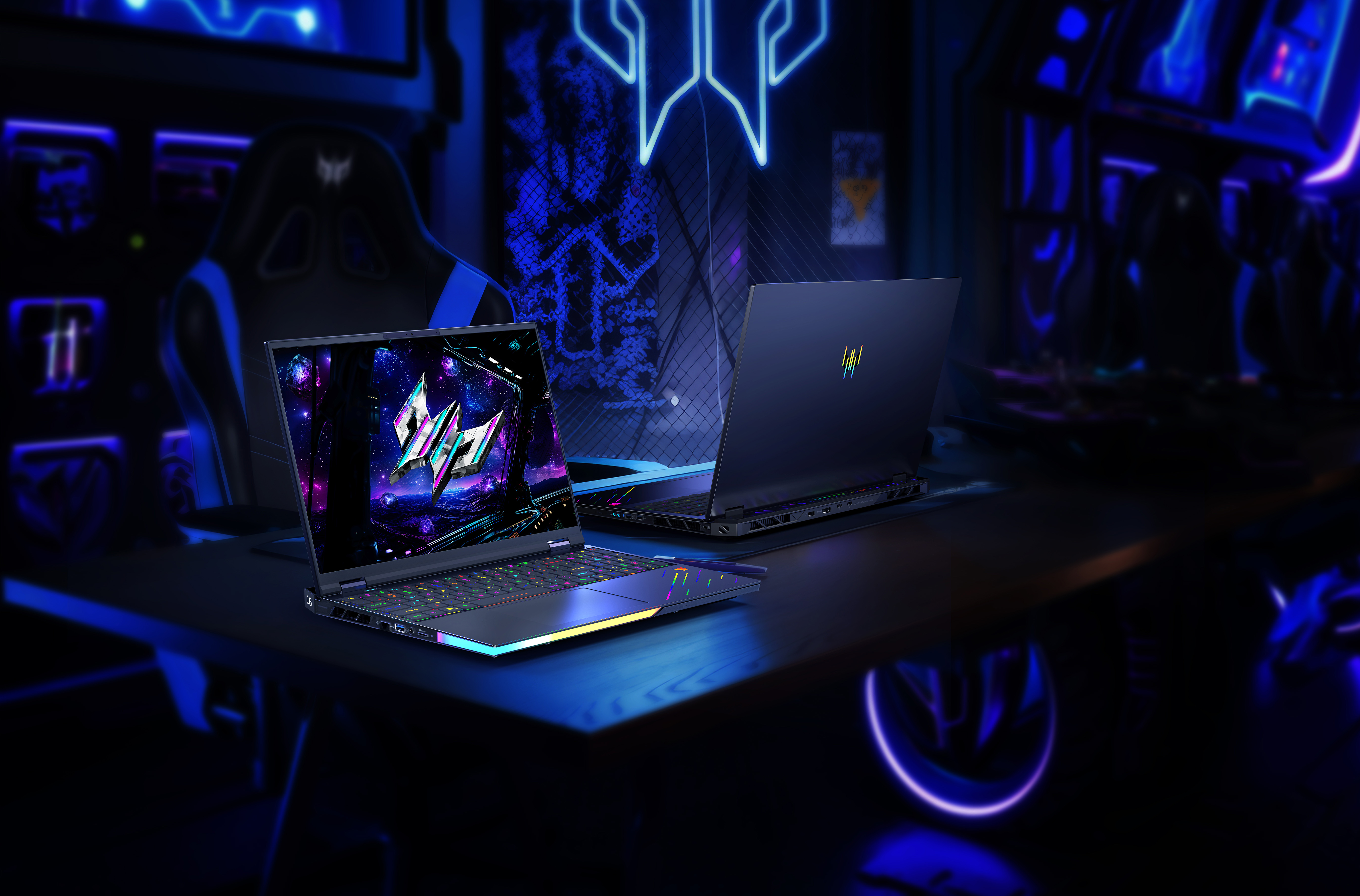
The Acer Predator Helios Neo 16 AI positions itself as an accessible entry into high-performance gaming with Intel's Core Ultra 9 275HX processor and Nvidia's RTX 5070 Ti GPU. The 16-inch OLED panel running at 240Hz represents a standout feature rarely found at this price point, delivering deep blacks and exceptional color accuracy across 100% of the DCI-P3 gamut. Performance tests show the laptop handles demanding titles like Doom: The Dark Ages at native resolution with frame rates hovering around 70fps on Ultra settings, jumping to 180fps with 4X frame generation enabled. However, the slim 19.9mm chassis forces thermal compromises that result in lower sustained clock speeds compared to competing laptops with the same processor, with CPU averaging 3362 MHz under prolonged loads versus 3903-4178 MHz in rivals. Battery life remains a persistent weakness, with most users reporting under three hours of mixed use and less than two hours when the 240Hz refresh rate stays locked.[1][2][3][4][5][6][7]
Pros
- Stunning 16-inch OLED display with 240Hz refresh rate and 100% DCI-P3 color coverage delivers exceptional visual quality for gaming and content creation
- Competitive pricing undercuts rivals like the Razer Blade 14 and Asus ROG Zephyrus G14 while offering similar or better specifications
- RTX 5070 Ti GPU with multi-frame generation technology achieves impressive frame rates, pushing demanding games well above 60fps at native resolution
- Comprehensive port selection includes HDMI, two USB-C ports, three USB-A ports, Ethernet, and microSD card reader with rear-mounted connections for clean cable management
- Upgradeable configuration with two RAM slots supporting up to 64GB DDR5 and dual M.2 SSD slots provides future expansion options
Cons
- Severe thermal throttling under sustained loads results in CPU clock speeds 15-20% lower than competing laptops with identical processors
- Exceptionally loud fan noise under gaming loads requires headphones for immersion, with multiple reviewers comparing the sound to a jet engine
- Abysmal battery life lasting under three hours for general use and less than two hours for gaming, with refresh rate often locked at power-draining 240Hz
- Limited VRAM at 12GB proves insufficient for local AI model processing and memory-intensive applications
- Quality control issues reported by multiple users including keyboard failures, network driver conflicts, and battery detection problems within weeks of purchase
The Acer Predator Helios Neo 16 AI positions itself as an accessible entry into high-performance gaming with Intel's Core Ultra 9 275HX processor and Nvidia's RTX 5070 Ti GPU. The 16-inch OLED panel running at 240Hz represents a standout feature rarely found at this price point, delivering deep blacks and exceptional color accuracy across 100% of the DCI-P3 gamut
Performance tests show the laptop handles demanding titles like Doom
The Dark Ages at native resolution with frame rates hovering around 70fps on Ultra settings, jumping to 180fps with 4X frame generation enabled. However, the slim 19.9mm chassis forces thermal compromises that result in lower sustained clock speeds compared to competing laptops with the same processor, with CPU averaging 3362 MHz under prolonged loads versus 3903-4178 MHz in rivals. Battery life remains a persistent weakness, with most users reporting under three hours of mixed use and less than two hours when the 240Hz refresh rate stays locked.[1][2][3][4][5][6][7]
Design and Build Quality
The Predator Helios Neo 16 AI adopts a conservative approach to gaming aesthetics with an all-black metal chassis finished in what Acer calls Obsidian Black. The laptop measures 19.9mm at its thinnest point, earning the "S" designation in some model variants, though a rear protrusion behind the hinge increases the overall footprint when closed. This design compromise provides additional internal volume for cooling components but creates a visual disconnect that makes the 16-inch form factor feel larger than competitors at the same screen size. The top lid features a single illuminated Predator logo that activates when powered on, avoiding the aggressive gaming aesthetic common in this category.[2]
Build quality proves solid with minimal chassis flex when lifting from corners, though the 2.7kg weight makes extended carrying sessions noticeable. The underside incorporates four rubberized feet for stability alongside extensive ventilation grilles that feed the dual AeroBlade 3D fans. Port placement demonstrates practical thinking with power, HDMI, and two USB-C connections positioned along the rear edge for cleaner cable management, while the left side houses Ethernet, USB-A, microSD card reader, and combined audio jack. Two additional USB-A ports occupy the right edge. However, all USB ports utilize 3.2 Gen 2 specifications with 10 Gbps maximum throughput rather than USB4 or Thunderbolt connectivity found on premium competitors.[1][2]
The keyboard spans the full width with an integrated numpad, standard F-row with dual-function media controls, and four-zone RGB backlighting customizable through Acer's PredatorSense software. Key travel feels adequate for gaming with springy feedback, though the oversized Copilot button positioned adjacent to the left arrow key proves easy to accidentally activate during gameplay. The trackpad measures smaller than expected for a 16-inch chassis and sits offset to the left of center, causing occasional accidental palm contact during typing. The trackpad surface feels less premium than glass alternatives on competing laptops but provides reliable tracking for basic navigation.[20][4][1][2]
Performance in Real Use
Gaming performance centers on the RTX 5070 Ti GPU configured with 140W TGP and 12GB GDDR7 memory
Testing with Doom
The Dark Ages at native 2560×1600 resolution on Ultra Nightmare settings produced approximately 70fps without frame generation, jumping to 110fps with 2X multiplier, 150fps at 3X, and 180fps using 4X frame generation. Cyberpunk 2077 running ray tracing ultra mode with DLSS multi-frame generation achieved well above 60fps, demonstrating the effectiveness of Nvidia's latest upscaling technology on the 5070 Ti architecture. Time Spy Extreme synthetic benchmarks positioned the Helios Neo 16 AI ahead of both the Razer Blade 14 and Asus ROG Zephyrus G14 in graphics performance, though actual game testing showed the ROG pulling ahead in certain titles.[9][8][1][2]
The critical weakness emerges under sustained workloads where thermal limitations become apparent. During 10-second CPU burst loads, the Intel Core Ultra 9 275HX achieved 3829 MHz average clock speed at 88°C and 130W power draw. However, extending stress tests beyond 30 minutes revealed average speeds dropping to 3362 MHz at 85°C with only 86W sustained power. These figures trail every competing laptop tested with the same processor, where average clocks ranged from 3903 MHz to 4178 MHz under identical conditions. GPU core clocks during 60-minute gaming sessions averaged 1935 MHz compared to 2315-2376 MHz in other RTX 5070 Ti laptops, directly impacting frame rate consistency in extended play sessions.[5]
Video editing workloads demonstrate exceptional capability with Topaz Video AI benchmark scores reaching 80,993 points - four times higher than competing mid-range gaming laptops and indicating strong suitability for content creation workflows. Cinebench multi-core rendering and GPU-accelerated tasks both delivered high performance relative to the laptop's price positioning. However, any workflow requiring sustained CPU performance for compilation, encoding, or scientific computing will encounter throttling after the initial burst period.[14][5]
The laptop ships with Windows power profiles locked to Eco or Balanced modes when running on battery, with full performance accessible only when connected to the 200W+ power adapter. This aggressive power management extends battery life slightly but eliminates any possibility of gaming performance while unplugged.[1][2]
Ease of Use
PredatorSense software provides centralized control over performance profiles, fan curves, RGB lighting, and real-time system monitoring with clearly labeled options that avoid the confusion common in competing manufacturer utilities. A dedicated keyboard button toggles between Eco, Balanced, and Turbo power modes without opening software, offering convenient on-the-fly adjustments. The BIOS includes granular controls for features like Advanced Optimus switching between integrated and discrete graphics, though accessing lower refresh rates requires diving into custom resolution utilities for users wanting to reduce battery drain.[6][2]
Initial setup requires disabling the startup sound through BIOS settings, as the default POST animation produces what reviewers described as a "horrific" audio blast with no ability to mute through the function key. Screen wake timing lags behind the audio, meaning users hear the sound without seeing the associated visual. The extensive ventilation and powerful cooling solution proves effective at managing component temperatures below 94°C during stress testing, running cooler than several competing gaming laptops. However, achieving this thermal performance requires fans operating at jet-engine volume levels that multiple reviewers identified as louder than recent competitors.[10][4][2][1]
The display defaults to 240Hz refresh rate with no automatic switching to lower refresh rates for battery conservation unless manually configured through Windows settings or third-party utilities. This oversight severely impacts portable usability for users unaware of the setting. RAM and storage upgrades require removing the bottom panel to access two SO-DIMM slots supporting up to 64GB DDR5 and dual M.2 NVMe slots, both standard procedures for experienced users.[9][8][6]
Reliability
Consumer reports reveal concerning patterns of hardware failures occurring within the first few months of ownership. Multiple users documented complete keyboard failures during gaming sessions where key input suddenly ceased, followed by fans ramping to maximum speed before automatic shutdown. Subsequent diagnostics identified faulty network card drivers installed through Windows Update as the root cause in some cases, requiring manual installation of Acer OEM drivers to resolve. Other users reported battery detection failures where the system completely stops recognizing the battery through BIOS, Windows ACPI, or EC telemetry - effectively converting the laptop to AC-only operation.[12]
Thermal complaints include temperatures reaching 85-90°C during standard gaming sessions without cooling pads, though these figures remain within Intel's specifications for the Core Ultra 9 275HX processor. One user described persistent overheating and crashes from day one on a unit costing over $1,000, ultimately requiring return and replacement. Gaming stuttering affecting multiple users points to potential inconsistencies in component binning or thermal paste application during manufacturing.[11][13]
The 76Wh battery achieves approximately 5 hours and 2 minutes in controlled testing at 180 nits brightness with Eco mode enabled and basic productivity tasks. Real-world usage reports consistently fall below this figure, with many users experiencing under three hours of mixed use and less than two hours when the display remains locked at 240Hz. The power adapter delivers over 200W through a proprietary barrel connector with one USB-C port supporting power delivery as an alternative.[7][6][5][1]
Wi-Fi 6E connectivity handles standard online gaming without reported issues, though the lack of Wi-Fi 7 means the laptop trails newer models already adopting the latest wireless standard. The 2.5Gb Ethernet port provides reliable wired connectivity for bandwidth-intensive scenarios. Bluetooth 5.4 handles peripheral connections without documented dropouts.[1]
Use Cases
The Predator Helios Neo 16 AI excels as a desktop replacement gaming system for users who primarily play at a fixed location with reliable power access. The OLED display with 240Hz refresh rate, 100% DCI-P3 color accuracy, and G-Sync support delivers exceptional visual quality for competitive multiplayer titles where high refresh rates provide tangible advantages. The 16:10 aspect ratio at 2560×1600 resolution offers additional vertical screen space compared to standard 16:9 panels, benefiting both gaming and productivity workflows.[4][3][1]
Content creators focusing on video editing find strong performance in GPU-accelerated encoding and effects processing, with benchmark results indicating this laptop handles 4K timeline editing more effectively than competitors at similar price points. The accurate color reproduction and high brightness make the display suitable for color grading work, though professional colorists will still require calibration for critical projects. The 32GB DDR5 memory handles moderate multitasking with Adobe Creative Suite applications, though the single 1TB SSD fills quickly with modern game libraries and raw video footage requiring external storage solutions.[14][4][1]
Students in game development, 3D modeling, or engineering programs benefit from the combination of capable GPU rendering and relatively portable form factor compared to 17-inch or 18-inch alternatives. The numpad proves useful for CAD work and data entry, while the comprehensive port selection accommodates external monitors, storage drives, and input devices without requiring docking stations. However, the poor battery life limits effectiveness for all-day campus use without access to power outlets.[6][5][2]
The laptop proves less suitable for business travel, content creation on location, or LAN party scenarios where portability and battery life become critical factors. The loud fan noise prevents use in quiet shared spaces like libraries or coffee shops when running demanding applications. Gamers prioritizing thin and light designs for portability should consider competing ultralight gaming laptops despite their higher cost.[4][2]
Long-Term Ownership Feedback
Limited long-term user data exists given the laptop's recent release in early 2025, though early adopter experiences raise concerns about sustained reliability. The pattern of hardware failures within the first 60 days suggests potential quality control inconsistencies in manufacturing or component sourcing. Users who received defect-free units report satisfaction with gaming performance and display quality provided they accept the constraints of near-permanent connection to AC power and headphone use during intensive gaming sessions.[13][11][12]
The thermal throttling documented in professional testing suggests performance degradation relative to spec-sheet expectations will become more apparent as users compare sustained workload results against competing laptops with identical processors. Software updates may address some optimization issues, though the fundamental constraint stems from the slim chassis design limiting thermal headroom rather than BIOS configuration. Acer's PredatorSense software receives regular updates that have historically improved fan curve efficiency and power management on previous Predator models.[5]
The 12GB VRAM on the RTX 5070 Ti represents adequate headroom for current AAA games at native resolution, though upcoming titles with enhanced texture quality may begin approaching memory limits within the typical 3-4 year gaming laptop lifecycle. The AI branding proves largely marketing-focused, with the 13 TOPS NPU insufficient for Copilot+ functionality and local AI model processing requiring more capable dedicated hardware. Owners interested in AI workloads will continue relying on GPU acceleration where the RTX 5070 Ti provides competitive capability.[3]
The upgradeable RAM and storage design provides a clear path for extending useful lifespan as 64GB memory and 2TB+ storage become standard recommendations for gaming and content creation. The OLED panel introduces potential burn-in concerns for users displaying static UI elements for extended periods, though modern OLED technology includes pixel-shifting and dimming features to mitigate these risks. Acer's warranty coverage and support responsiveness will significantly impact long-term ownership satisfaction given the documented hardware issues affecting early production units.[11][12]
| Specification | Details |
|---|---|
| Processor | Intel Core Ultra 9 275HX (20 cores: 8P + 12E, up to 5.2 GHz) [8][9] |
| Graphics | Nvidia GeForce RTX 5070 Ti (12GB GDDR7, 140W TGP) [8][9] |
| Display | 16-inch OLED, 2560 x 1600 (WQXGA), 240Hz, 400 nits, 100% DCI-P3, G-Sync [3][1] |
| Memory | 32GB DDR5-6400 (dual channel, expandable to 64GB) [4][8] |
| Storage | 1TB PCIe Gen 4.0 NVMe SSD (2x M.2 slots) [8][9] |
| Battery | 76Wh capacity, approximately 5 hours claimed [5] |
| Connectivity | Wi-Fi 6E, Bluetooth 5.4, 2.5Gb Ethernet [1] |
| Ports | 2x USB-C 3.2 Gen 2, 3x USB-A 3.2, HDMI, 3.5mm audio, microSD reader [1][2] |
| Dimensions | 366 x 275.5 x 19.9mm (14.4 x 10.8 x 0.78 inches) [4] |
| Weight | 2.7 kg (5.95 lbs) [1][2] |
| Cooling | 5th Gen AeroBlade 3D fans with liquid metal thermal compound [4] |
| Materials | Black metal chassis with rubberized feet [2] |
Buy
- You prioritize exceptional display quality and want OLED technology with high refresh rates at a competitive price point[2][3]
- You need strong gaming performance for modern AAA titles without spending premium prices on ultralight alternatives[1][2]
- You value port variety and prefer rear-mounted connections for cleaner desk setups[1]
- You want upgradeable components with accessible RAM and storage expansion for future-proofing[8](https:/ anoreview.net/en/laptop/acer-predator-helios-neo-16-ai-2025)
- You primarily game with headphones and can accept loud fan noise as a trade-off for thermal management[10][2]
Skip
- You need portable computing with reasonable battery life for work or travel away from power outlets[7][5][6]
- You require sustained CPU performance for professional workloads like video rendering or compilation tasks[5]
- You're sensitive to fan noise and want quieter thermal solutions for shared spaces or recording environments[4][2]
- You need robust AI processing capabilities beyond GPU-accelerated tasks, as the NPU delivers only 13 TOPS[3]
- You expect consistent build quality and want to avoid potential hardware issues requiring warranty support[12][11](https://www.reddit.com/r/GamingLaptops/comments/1lmngts ever_buy_acer_predator_helios_neo_16_is_a_hot/)
Critic Reviews
No reviews yet.
User Reviews
No reviews yet.