
Acer Swift Go 14
Intel's Meteor Lake processors power this ultraportable through demanding workloads, while its bright display, Thunderbolt 4 connectivity, and robust port selection address professional needs in a sub-3-pound package.
Updated January 28, 2026
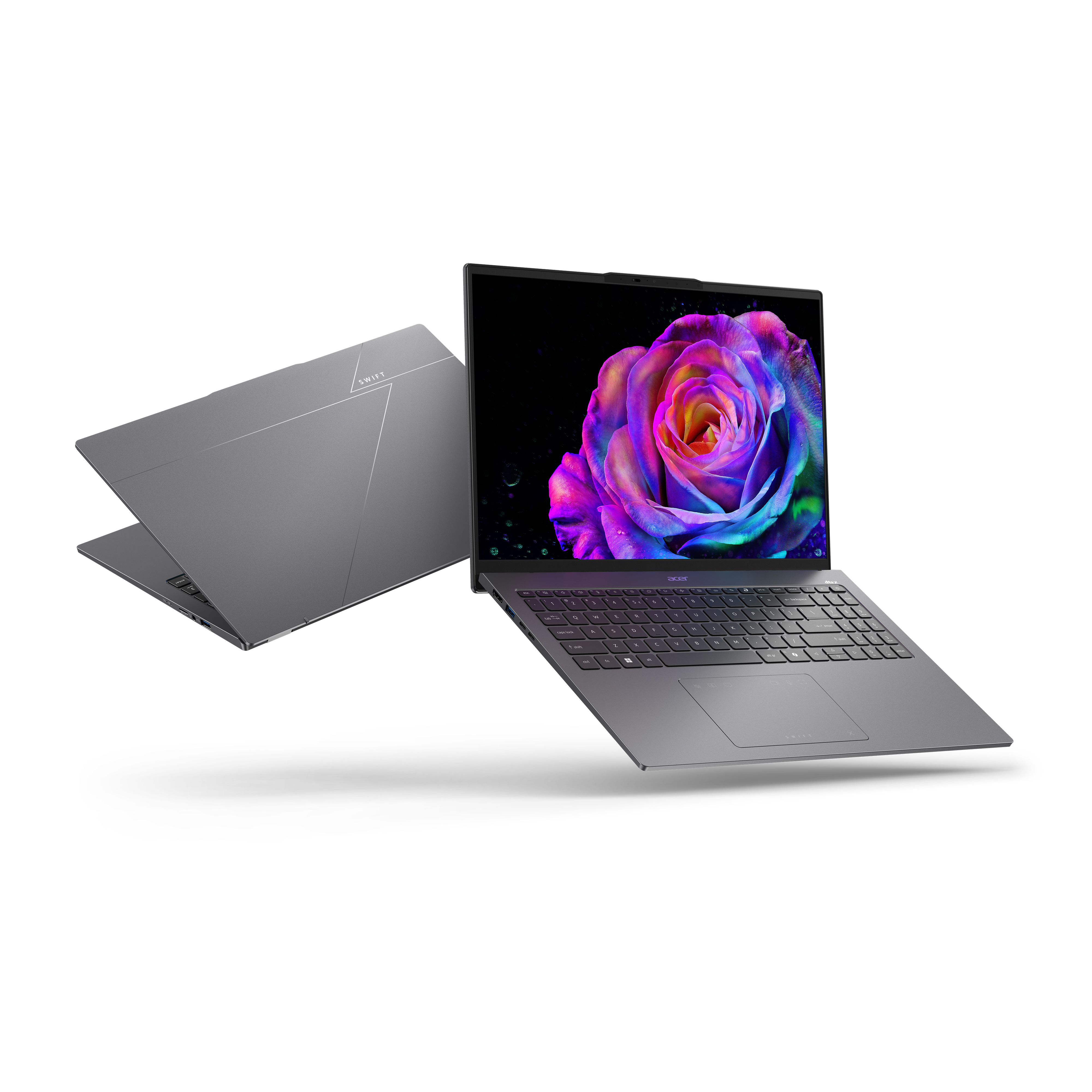
The Acer Swift Go 14 represents a significant stride in the ultraportable category, delivering Intel Core Ultra processing power in an aluminum chassis that weighs under three pounds. This 14-inch laptop targets professionals, students, and content consumers who require reliable performance without bulk. Available with either a 60Hz FHD+ IPS touchscreen or a superior 90Hz 2.8k OLED panel, the Swift Go 14 provides display flexibility for different use cases. The laptop achieves excellent battery endurance of approximately 11 hours during typical productivity tasks. Its comprehensive port array includes dual Thunderbolt 4 connections, dual USB-A ports, HDMI output, and a microSD card reader. While the keyboard feels somewhat mushy during extended typing sessions and speakers lack bass depth, the Swift Go 14 compensates with strong productivity benchmarks, a quality 1080p webcam, and genuine value in the mid-range segment.[1][2][3][4][5]
Pros
- Intel Core Ultra processors deliver outstanding multi-core performance exceeding many pricier alternatives with identical chips
- Dual Thunderbolt 4 ports enable fast file transfers and dual 4K display connectivity through single cables
- Available OLED display option offers 90Hz refresh rate with full DCI-P3 color coverage for content creators
- Sturdy aluminum construction weighs under three pounds while maintaining rigidity across lid and deck
- Battery longevity reaches 11 hours during light productivity use, sufficient for full workdays
Cons
- Keyboard requires substantial actuation force creating fatigue during extended typing sessions
- Speakers produce vocal-centric audio with minimal bass, limiting music playback quality
- Trackpad exhibits sluggish response and excessive friction during window dragging operations
- Bottom surface reaches 52°C during performance mode making lap use uncomfortable without protection
- Integrated Intel Arc graphics limit gaming performance to older or lightweight titles at reduced settings
The Acer Swift Go 14 represents a significant stride in the ultraportable category, delivering Intel Core Ultra processing power in an aluminum chassis that weighs under three pounds. This 14-inch laptop targets professionals, students, and content consumers who require reliable performance without bulk. Available with either a 60Hz FHD+ IPS touchscreen or a superior 90Hz 2.8k OLED panel, the Swift Go 14 provides display flexibility for different use cases. The laptop achieves excellent battery endurance of approximately 11 hours during typical productivity tasks. Its comprehensive port array includes dual Thunderbolt 4 connections, dual USB-A ports, HDMI output, and a microSD card reader. While the keyboard feels somewhat mushy during extended typing sessions and speakers lack bass depth, the Swift Go 14 compensates with strong productivity benchmarks, a quality 1080p webcam, and genuine value in the mid-range segment.[1][2][3][4][5]
Design and Build Quality
The Acer Swift Go 14 employs an aluminum chassis construction that delivers rigidity while maintaining portability at 2.91 pounds. The silver finish exhibits a reflective sheen when light contacts the minimalist lid, which features a subtle Acer logo and visible webcam protrusion. RTINGS testing confirms the build quality as "great" with sturdy aluminum and plastic materials forming the chassis. The lid and keyboard deck exhibit minor flex under pressure, though not sufficient to raise durability concerns during typical use. Screen twisting produces occasional clipping noises, but long-term implications remain unclear based on available testing.[8][5][4][1]
The hinge mechanism opens smoothly with one hand, though the chassis lifts slightly during this action. This lift-and-tilt design elevates the rear of the laptop when opened, improving airflow beneath the chassis while angling the keyboard for comfortable typing posture. Rubber feet on the bottom provide stable grip on desk surfaces. The finish resists scratches effectively, though the touchpad and keys accumulate fingerprint oils requiring periodic cleaning. At 12.3 x 8.6 x 0.59 inches, the Swift Go 14 matches dimensions of competing ultraportables including the Lenovo Slim 7i Gen 9 and Asus Zenbook 14 OLED.[5][4][1]
Performance in Real Use
Intel's Meteor Lake processors power the Swift Go 14 through demanding productivity workloads with authority. The Core Ultra 7 155H configuration achieves a Geekbench 6.2 multi-core score of 12,612, surpassing the category average of 9,910 and outperforming numerous pricier alternatives equipped with identical silicon. This processing capability handles text processing, spreadsheets, web browsing, and presentations without hesitation. More intensive tasks including programming, simulations, and video transcoding remain within the laptop's capability envelope.[2][4][1]
HandBrake video conversion testing demonstrates practical performance, converting 4K footage to 1080p resolution in 5 minutes and 12 seconds. Storage performance impresses with the Western Digital SN740 1TB SSD delivering transfer rates of 1,783 megabytes per second during file duplication tests, exceeding competitors by substantial margins. The dual M.2 slots support user upgrades up to 2TB capacity per slot using PCIe Gen 4 NVMe drives.[4][1]
Graphics performance reveals expected limitations of integrated Intel Arc silicon. Light gaming remains possible with older titles or less demanding games, though users must accept reduced graphical settings to maintain playable frame rates
Civilization VI
Gathering Storm achieves 36 frames per second at 1080p resolution, falling slightly below the 43 fps category average but remaining functional for turn-based strategy. Modern AAA titles exceed the integrated graphics capabilities.[7][1][4]
Ease of Use
The keyboard presents a mixed usability profile. Keys offer substantial travel distance with stable actuation, yet require considerable force to register inputs. This combination creates typing fatigue during sessions exceeding several hours. PCMag notes "snappy, engaging feedback" with effective white backlighting, though criticizes the "unintuitive arrow key cluster" squeezing half-height directional keys between full-size lateral keys. Laptop Mag testing achieved 108 words per minute with 97% accuracy, approaching reviewer baseline performance on mechanical keyboards. The dedicated Copilot key replaces the traditional right Control key, providing direct access to Windows 11's AI assistant.[2][5][1][4]
Touchpad performance draws criticism across multiple reviews. The 3.1 x 5.1-inch surface exhibits sluggish response with excessive friction during cursor movement. Dragging files between folders proves difficult, and maintaining click-and-drag operations creates unsatisfactory tactile feedback. The touchpad incorporates media controls during video playback, displaying play/pause, volume, and fullscreen buttons. However, single-tap click functionality remains active during media control mode, causing accidental pauses and unwanted interactions.[4]
The 14-inch display options serve different user priorities. The FHD+ IPS touchscreen delivers 1920 x 1200 resolution with responsive touch input, though the glass panel generates friction during window dragging. Brightness testing measures 383 nits average, exceeding the mainstream laptop average and proving sufficient for indoor environments and moderate outdoor use. The 16:10 aspect ratio provides additional vertical space compared to standard 16:9 panels, benefiting document reading and web browsing. Color accuracy tests show excellent calibration out of the box with full sRGB coverage on IPS models. The optional 2.8k OLED panel upgrades to 90Hz refresh rate with full DCI-P3 color gamut, serving content creators requiring color-critical accuracy. Reddit users report "outstanding" display brightness rarely requiring settings above 70% during daylight use with "fantastic" HDR performance.[6][9][5][1][4]
Reliability
Thermal management reveals design compromises favoring thinness over cooling efficiency. Performance mode operation elevates keyboard temperatures to 46.4°C with a hotspot near the number 4 key potentially causing discomfort. The bottom surface reaches 52°C (125.6°F) during sustained loads, making direct lap use uncomfortable without protective boards. Fan noise measures 44.7 dBA in Performance mode, remaining audible though not excessively loud. Balanced mode reduces keyboard temperatures to 47.7°C with 41.9 dBA fan noise, while Silent mode further decreases thermal output to 42.6°C and 37.6 dBA. Thermal throttling remains minimal during extended stress testing.[15][1]
The vent design directs exhaust toward the display hinge, raising minor concerns about long-term OLED panel exposure to heated airflow. However, the plastic chin absorbs significant heat before reaching the display, with panel temperatures measuring approximately 45°C near exhaust zones. Component reliability benefits from Intel's mature Meteor Lake architecture and established LPDDR5X memory standards. The soldered RAM configuration prevents user upgrades but eliminates connection failures associated with socketed modules.[15][1]
Use Cases
The Swift Go 14 excels in professional productivity environments where portability and performance intersect. Students carrying laptops between classes benefit from the sub-3-pound weight and 11-hour battery endurance. The 1080p webcam delivers sharp video quality for remote meetings, with clear microphone audio capturing voices without noticeable background interference. Dual Thunderbolt 4 ports enable connection to dual 4K displays through single cables while supporting 40Gbps data transfers for external storage arrays.[3][5][1][4]
Content creators working with photography and video editing gain color-accurate displays suitable for professional workflows. The OLED option provides full DCI-P3 coverage required for HDR content production, though users must accept potential burn-in risks from static interface elements. Processing power handles Adobe Creative Suite applications competently, though render-intensive 3D work or high-resolution video timeline scrubbing may expose limitations of integrated graphics.[1]
Business travelers appreciate the comprehensive port selection eliminating dongle dependence. USB-A ports accommodate legacy peripherals including wired mice and external drives, while the HDMI port connects to conference room projectors without adapters. The Kensington lock slot addresses security requirements in shared office environments. Wi-Fi 6E connectivity provides fast wireless speeds and reduced latency in compatible network environments.[1][4]
Long-term Ownership Feedback
Extended ownership experiences reveal persistent keyboard concerns. Users report ongoing fatigue during multi-hour typing sessions attributable to mushy key feel and high actuation requirements. The touchpad continues generating friction complaints affecting daily workflows. Speaker quality remains a consistent weakness, with vocal-centric tuning and absent bass limiting music enjoyment. Users requiring quality audio invest in external speakers or headphones.[5][2][4][1]
Battery longevity meets but does not exceed expectations. RTINGS confirms approximately 11 hours during light productivity use and 10 hours during video playback. Laptop Mag testing measures 8 hours and 25 minutes of continuous web browsing, falling below the 10-hour category average and trailing competitors by significant margins. The OLED display option further reduces battery life compared to IPS configurations. Users working full days without charging access may find endurance marginal.[4][1]
Serviceability earns decent marks with straightforward internal access requiring removal of ten torque screws and careful clip release. The storage drive beneath cooling fans necessitates ribbon cable removal before access. Both M.2 slots accept standard 2280 form factor drives enabling user upgrades. However, soldered RAM prevents memory expansion beyond the initially configured capacity. Pre-installed bloatware including McAfee LiveSafe, Evernote subscription prompts, and casual games clutter the Windows 11 installation requiring cleanup.[1]
Best Buy customer reviews consistently recommend the Swift Go 14 based on multi-month ownership, with users noting "zero purchase regrets" and favorable value comparisons against premium Surface Laptop alternatives. Reddit community members praise display quality and color accuracy maintaining consistency across multiple devices. Long-term Acer Swift owners report satisfaction with previous generation models, expressing confidence in updated versions incorporating improved specifications.[10][9][15]
| Specification | Details |
|---|---|
| Processor Options | Intel Core Ultra 5 125H, Core Ultra 7 155H, Core Ultra 9 185H (Meteor Lake) [1] |
| Display Options | 14" IPS 1920x1200 60Hz touchscreen (100% sRGB); 14" OLED 2880x1800 90Hz (100% DCI-P3) [1] |
| Memory | 8GB, 16GB, or 32GB LPDDR5X 6400MHz (soldered) [1] |
| Storage | 512GB, 1TB, or 2TB M.2 PCIe Gen 4 NVMe SSD (dual slots) [1] |
| Graphics | Intel Arc Graphics (integrated) [1] |
| Connectivity | Wi-Fi 6E (Intel Killer 1675i), Bluetooth, Gigabit Ethernet support [1][8] |
| Ports | 2x Thunderbolt 4, 2x USB-A 3.2 Gen 1, 1x HDMI 2.0, microSD reader, 3.5mm audio [1] |
| Webcam | 1080p with physical shutter [1] |
| Battery | 65Wh lithium-ion [8] |
| Dimensions | 12.3 x 8.6 x 0.59 inches [8] |
| Weight | 2.91 pounds [8] |
| Operating System | Windows 11 Home [8] |
| Security | Fingerprint reader integrated in power button [1] |
Buy
- Professionals requiring portable performance for programming, simulations, and productivity applications benefit from Intel Core Ultra efficiency[3][1]
- Content creators gain color-accurate displays with full sRGB coverage on IPS models or DCI-P3 on OLED variants[1]
- Remote workers appreciate the 1080p webcam delivering sharp image quality for video conferencing[4][1]
- Users needing extensive connectivity options access Thunderbolt 4, USB-A, HDMI, and microSD without dongles[4][1]
- Students and travelers value the lightweight aluminum chassis weighing 2.91 pounds for daily carrying[8][5]
Skip
- Extended typing sessions cause discomfort due to mushy key feel and high actuation requirements[5][1]
- Audio enthusiasts find speaker quality insufficient for music enjoyment without external solutions[2][1]
- Gamers seeking dedicated GPU performance must look elsewhere as integrated graphics handle only basic titles[7][1]
- Users prioritizing silent operation encounter persistent fan noise even during moderate workloads[2][5]
- Budget constraints favor alternatives offering longer battery life beyond the 8-11 hour range[4]
Critic Reviews
No reviews yet.
User Reviews
No reviews yet.