
Apple MacBook Air (M1)
The M1 MacBook Air rewrote ultraportable expectations with groundbreaking ARM-based performance, all-day battery life, and whisper-quiet operation that still holds up years after launch.
Updated January 28, 2026
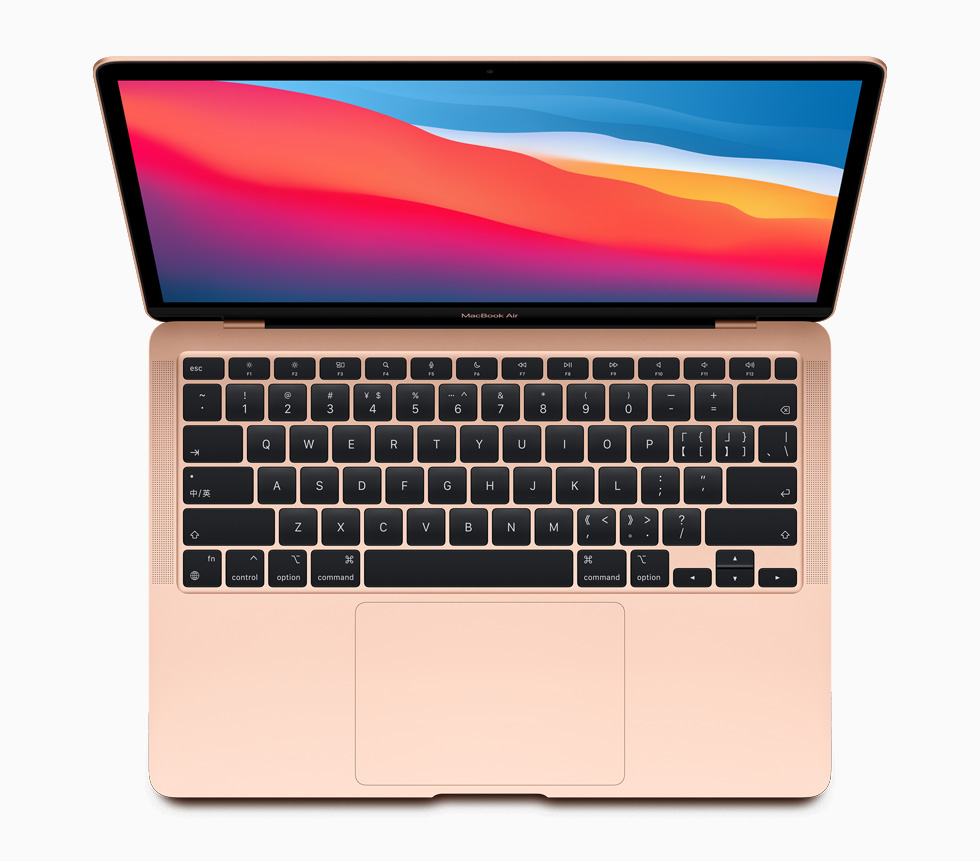
The MacBook Air with M1 chip represents a watershed moment in laptop design, delivering performance that rivals or exceeds traditional pro-level machines while maintaining the Air's signature portability and adding unprecedented battery endurance. Apple's custom ARM-based M1 processor combines an 8-core CPU, 7 or 8-core GPU, and 16-core Neural Engine in a unified architecture that eliminates the need for active cooling, resulting in a completely fanless design that never compromises on speed. Critics consistently praised its ability to handle demanding workflows including 4K video editing, heavy multitasking with dozens of browser tabs, and professional creative applications without thermal throttling or performance degradation. The machine delivers 14-18 hours of real-world battery life, outpacing Windows competitors by substantial margins while maintaining a slim 1.3 kg unibody aluminum chassis. Even years after its 2020 launch, the M1 Air continues to receive strong recommendations from both critics and long-term users who report minimal performance degradation and exceptional reliability for everyday productivity tasks.[3][4][5][6][7][8][9][10][11][1]
Pros
- Silent fanless operation with no thermal throttling under typical workloads
- Exceptional battery life lasting 14-18 hours for web browsing and video playback
- Desktop-class performance that handles 4K video editing and heavy multitasking effortlessly
- Seamless compatibility with both native ARM apps and Intel applications through Rosetta 2 emulation
- Premium build quality with lightweight aluminum construction weighing just 1.3 kg
Cons
- Limited to two USB-C Thunderbolt 3 ports with no USB-A or HDMI connectivity
- 720p FaceTime HD camera quality lags behind competitors and newer MacBook models
- Base 8GB unified memory may show limitations with extremely intensive multitasking
- Thicker screen bezels compared to modern ultraportable designs
- Some reports of logic board failures in small percentage of units outside warranty periods
The MacBook Air with M1 chip represents a watershed moment in laptop design, delivering performance that rivals or exceeds traditional pro-level machines while maintaining the Air's signature portability and adding unprecedented battery endurance. Apple's custom ARM-based M1 processor combines an 8-core CPU, 7 or 8-core GPU, and 16-core Neural Engine in a unified architecture that eliminates the need for active cooling, resulting in a completely fanless design that never compromises on speed. Critics consistently praised its ability to handle demanding workflows including 4K video editing, heavy multitasking with dozens of browser tabs, and professional creative applications without thermal throttling or performance degradation. The machine delivers 14-18 hours of real-world battery life, outpacing Windows competitors by substantial margins while maintaining a slim 1.3 kg unibody aluminum chassis. Even years after its 2020 launch, the M1 Air continues to receive strong recommendations from both critics and long-term users who report minimal performance degradation and exceptional reliability for everyday productivity tasks.[3][4][5][6][7][8][9][10][11][1]
Design and Build Quality
The MacBook Air M1 retains Apple's iconic wedge-shaped unibody aluminum construction that has defined the Air line for over a decade. Weighing just 1.3 kg, the chassis delivers exceptional portability without sacrificing structural integrity, though some users note it feels slightly less substantial than older, thicker MacBook Pro models. The premium metal finish resists fingerprints well, though the exposed aluminum surfaces can accumulate minor scratches and dents with regular transport. Critics consistently praise the build quality as befitting Apple's reputation, with tight tolerances and zero flex in the deck or display.[24][2][11][4]
The keyboard features Apple's refined Magic Keyboard mechanism with 1mm key travel, ambient light sensor, and dedicated Touch ID fingerprint sensor integrated into the power button. Professional reviewers and consumers alike highlight the typing experience as excellent, with users reporting typing speeds exceeding their averages on the responsive keys. The Force Touch trackpad measures 4.7 x 3.2 inches, offering massive surface area with haptic feedback that simulates physical clicks while enabling pressure-sensitive gestures. Long-term users consistently cite the trackpad as superior to Windows laptop alternatives, with smooth glass surface and precise cursor control.[2][6][8][21][17][12]
The 13.3-inch Retina display delivers 2560x1600 resolution with True Tone technology that automatically adjusts color temperature based on ambient lighting. While the bezels appear thicker than cutting-edge Windows ultraportables or newer MacBook models, the screen quality itself earns praise for vibrant colors, sharp text rendering, and comfortable viewing angles. The display brightness, while not matching the MacBook Pro's peak output, proves more than adequate for indoor use and outdoor visibility in most conditions.[14][22][6][4][12]
Performance in Real Use
The M1 chip fundamentally redefined expectations for ultraportable performance when it launched. Professional reviewers subjected the Air to demanding workflows including simultaneous streaming of multiple 4K videos, running 20+ Chrome browser tabs, operating professional creative applications like Photoshop and Adobe Premiere, and even editing 8K footage in Final Cut Pro. In every scenario, the fanless M1 Air maintained fluid responsiveness without thermal throttling or performance degradation.[1][8][5][7]
Benchmark testing revealed the M1's 8-core CPU architecture, split between four high-performance and four efficiency cores, consistently outperformed Intel's 11th generation mobile processors by significant margins. The unified memory architecture, where CPU, GPU, and Neural Engine share a common pool of RAM, delivers efficiency gains that translate to real-world speed advantages. Applications optimized for ARM architecture through native Apple Silicon versions launch instantaneously and maintain snappy performance even under multitasking loads.[20][2][4]
Legacy Intel applications running through Rosetta 2 emulation exhibit minimal performance penalties, with critics noting that Chrome, Slack, and other non-native apps often felt faster on the M1 Air than on contemporary Intel-based Windows machines. The 7 or 8-core GPU configuration handles casual gaming substantially better than integrated graphics in competing ultraportables, though the Air remains unsuitable for AAA gaming at high settings.[25][7][1]
Consumer reports from users years after purchase confirm sustained performance without degradation, with base 8GB models handling typical productivity workflows smoothly. However, users pushing the 8GB configuration to extremes with virtual machines, extensive browser tabs, or professional video editing report occasional slowdowns and memory pressure. The 16GB configuration eliminates these constraints for power users requiring maximum headroom.[9][3][13][14][5]
Ease of Use
macOS Big Sur and subsequent updates integrate seamlessly with the M1 hardware, delivering an operating system experience optimized specifically for ARM architecture. The machine boots nearly instantaneously, with users reporting they simply close and reopen the lid rather than performing full shutdowns due to negligible standby battery drain. Application compatibility proved broader than anticipated, with the vast majority of Mac software running flawlessly either natively or through Rosetta 2 translation.[16][7][1][4]
The addition of iOS and iPadOS app support through the Mac App Store expands the available software ecosystem significantly, allowing iPhone and iPad applications to run on the Air. This cross-platform compatibility strengthens the value proposition for users already invested in Apple's ecosystem. iCloud integration, AirDrop file transfers, and Universal Clipboard functionality between Apple devices function reliably, with users specifically praising the seamless ecosystem experience.[2][5][7][4][12]
The port selection presents the primary usability constraint, with just two Thunderbolt 3/USB-C ports requiring dongles or hubs for connecting USB-A peripherals, external displays via HDMI, or SD card readers. Users frequently cite this limitation as the most frustrating aspect of daily use, particularly when needing to connect multiple accessories simultaneously. The 30W USB-C power adapter charges relatively slowly compared to higher-wattage options, though battery endurance means users charge infrequently.[6][4][12]
Reliability
Long-term ownership reports spanning three to four years indicate the M1 Air maintains excellent reliability for the majority of users. Consumers report battery health remaining above 80% after multiple years of daily use, with real-world endurance still exceeding most competing laptops even with aged batteries. The fanless design eliminates mechanical failure points, with no moving parts beyond the keyboard and trackpad to degrade over time.[9][17][7][10]
However, a subset of users report logic board failures occurring within two years of purchase, particularly in units that fell outside warranty coverage. These failures necessitate expensive repairs equivalent to roughly 50% of the laptop's original value, and some users experienced repeated failures even after board replacement. While these reports represent a minority of the installed base, the severity and cost of logic board issues warrant consideration, particularly for budget-conscious buyers declining AppleCare+ extended warranty coverage.[15]
Screen issues including pixel dimming and brightness fluctuations affect some units, typically manifesting after the standard one-year warranty expires. The 720p FaceTime camera, while functional, represents dated technology that falls short of the 1080p cameras now standard in premium laptops. Software support remains robust, with Apple providing macOS updates expected to continue through at least 2027, giving the M1 Air a software support lifecycle of seven years from launch.[19][18][15][6][12]
Use Cases
The M1 Air excels as a productivity workhorse for students, professionals, and creative users who prioritize portability and battery endurance. Students benefit from all-day battery life that eliminates the need to seek outlets between classes, combined with sufficient performance for research, writing, coding, and media consumption. The silent operation proves particularly valuable in library environments and quiet shared spaces.[18][13][21][10]
Professional users handling documents, spreadsheets, presentations, web applications, and video conferencing find the M1 Air delivers desktop-class performance in a portable form factor. Creative professionals working with photo editing in applications like Photoshop, light video editing in Final Cut Pro or Adobe Premiere, and music production report smooth performance for most projects. However, professionals requiring 16GB RAM for extensive Lightroom catalogs, multiple virtual machines, or extremely large video projects should opt for the upgraded memory configuration.[13][8][5][12]
Casual users streaming video, browsing the web, managing email, and consuming media benefit from the exceptional battery life that enables multi-day use between charges for light workloads. The display quality and integrated speakers deliver satisfying entertainment experiences, though the speakers lack deep bass response. Developers coding in environments like Visual Studio Code, running compilation tasks, and managing multiple development tools report strong performance, particularly when using native ARM-optimized toolchains.[23][16][21][13][12]
Long-Term Ownership Feedback
Users maintaining their M1 Airs for three to four years report remarkably consistent performance that feels nearly identical to new. The combination of fanless operation, solid-state storage with no moving parts, and macOS optimization for the M1 architecture contributes to longevity that exceeds typical laptop degradation patterns. Battery health retention proves better than historical Mac laptop norms, with users reporting 80-85% capacity retention after three years of daily use.[11][3][17][9]
The value proposition strengthens over time as the M1 Air continues receiving the latest macOS updates and maintaining compatibility with current applications. Users who purchased the Air at launch in 2020 report no compelling reason to upgrade even years later, as the performance remains adequate for evolving workflow demands. Compared to Windows laptops from the same generation, the M1 Air's combination of sustained performance, superior battery life, and reliable software updates gives it a longevity advantage that justifies the initial premium.[16][19][3][17][9][10]
Storage capacity emerges as the primary constraint for long-term ownership, with the 256GB base configuration requiring careful file management or external storage solutions. Users who selected 512GB or larger configurations at purchase report significantly improved long-term satisfaction. The non-upgradeable nature of all components necessitates careful configuration selection at purchase, as RAM and storage cannot be expanded after the fact.[20][14][6]
| Specification | Details |
|---|---|
| Processor | Apple M1 chip with 8-core CPU (4 performance, 4 efficiency cores), 7 or 8-core GPU, 16-core Neural Engine [6] |
| Memory | 8GB unified memory, configurable to 16GB [6] |
| Storage | 256GB SSD, configurable to 512GB, 1TB, or 2TB [6] |
| Display | 13.3-inch Retina display with True Tone technology [14][20] |
| Battery | 49.9-watt-hour lithium-polymer battery; up to 15 hours wireless web, up to 18 hours video playback [6] |
| Connectivity | Wi-Fi 6 (802.11ax), Bluetooth 5.0, Two Thunderbolt 3/USB-C ports [20][6] |
| Camera | 720p FaceTime HD camera with advanced image signal processor [6] |
| Keyboard | Backlit Magic Keyboard with 78/79 keys, Touch ID, Force Touch trackpad [6] |
| Dimensions | Lightweight wedge design, 1.3 kg weight [11] |
| Materials | Unibody aluminum construction [2] |
Buy
- You need all-day battery life without compromising on performance for productivity work[10][16]
- You want silent operation for use in quiet environments like libraries or meetings[10][7]
- You're transitioning from Windows and want superior trackpad quality and ecosystem integration[17][12]
- You require a portable machine for creative work including photo editing and 4K video projects[5][1]
- You value long-term software support with macOS updates expected through at least 2027[18][19]
Skip
- You frequently need to connect multiple peripherals simultaneously and require diverse port selection[4][12]
- You regularly participate in video calls requiring high-quality webcam performance[6][12]
- Your workflow demands 16GB or more RAM for running virtual machines or extremely memory-intensive applications[20][6]
- You prefer a more modern design aesthetic with slimmer bezels and contemporary styling[4]
- You need Windows compatibility through Boot Camp, which is not supported on M1 Macs[12]
Critic Reviews
No reviews yet.
User Reviews
No reviews yet.