
Apple MacBook Pro 16-inch (M4 Pro, 2024)
Apple's 2024 flagship balances exceptional battery endurance with M4 Pro processing power, nano-texture display technology, and Thunderbolt 5 connectivity for mobile professionals who demand uncompromising performance.
Updated January 28, 2026
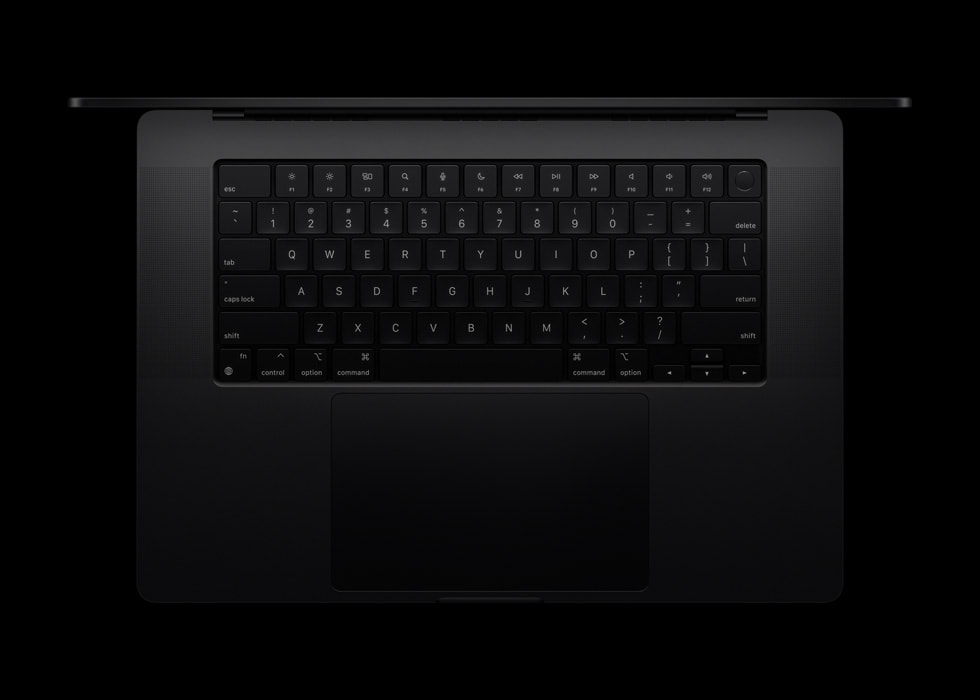
The Apple MacBook Pro 16-inch with M4 Pro represents an iterative refinement of Apple's professional laptop formula, delivering significant performance gains through its 14-core CPU and 20-core GPU configuration. The standout addition is the optional nano-texture display, which dramatically reduces glare without compromising color accuracy - a game-changer for professionals working in varied lighting conditions. Battery life remains exceptional, with real-world testing showing over 24 hours of mixed use, allowing users to work through multiple days without charging. The machine maintains the same premium aluminum chassis as its predecessors, featuring an improved 12MP Center Stage webcam and upgraded Thunderbolt 5 ports that deliver up to 120 Gbps bandwidth. While the visual design remains unchanged from the 2023 model, the internal upgrades make this a compelling upgrade for professionals running intensive creative workflows, particularly video editors, 3D artists, and photographers who benefit from the significantly faster single-core performance that currently faces no competition in the laptop market.[1][2][3][4]
Pros
- Exceptional battery life exceeding 24 hours in real-world testing, maintaining full performance on battery power
- M4 Pro chip delivers industry-leading single-core performance and significant multi-core improvements over M3 generation
- Optional nano-texture display coating dramatically reduces glare and reflections without sacrificing color accuracy or brightness
- Thermal management allows sustained performance with minimal fan noise during typical workflows
- Thunderbolt 5 connectivity provides up to 120 Gbps bandwidth for professional storage and display requirements
Cons
- M4 chips run approximately 10 degrees Celsius hotter than M2 generation, causing fans to activate more frequently under load
- Identical external design to 2023 and 2022 models offers no visual differentiation between generations
- Display notch continues to interfere with dialog boxes in certain applications despite minimal functional impact
- Weight of 2.1 kg makes extended mobile use less comfortable compared to smaller alternatives
- Premium RAM and storage upgrades carry substantial cost increases that exceed competitive Windows alternatives
The Apple MacBook Pro 16-inch with M4 Pro represents an iterative refinement of Apple's professional laptop formula, delivering significant performance gains through its 14-core CPU and 20-core GPU configuration. The standout addition is the optional nano-texture display, which dramatically reduces glare without compromising color accuracy - a game-changer for professionals working in varied lighting conditions. Battery life remains exceptional, with real-world testing showing over 24 hours of mixed use, allowing users to work through multiple days without charging. The machine maintains the same premium aluminum chassis as its predecessors, featuring an improved 12MP Center Stage webcam and upgraded Thunderbolt 5 ports that deliver up to 120 Gbps bandwidth. While the visual design remains unchanged from the 2023 model, the internal upgrades make this a compelling upgrade for professionals running intensive creative workflows, particularly video editors, 3D artists, and photographers who benefit from the significantly faster single-core performance that currently faces no competition in the laptop market.[1][2][3][4]
Design and Build Quality
The MacBook Pro 16-inch M4 Pro maintains Apple's established aluminum unibody construction, delivering a premium feel that matches its professional positioning. The chassis dimensions remain identical to the 2023 and 2022 models at 16.8mm thickness and 2.1kg weight, providing no external visual distinction between generations. The Space Black anodized finish resists fingerprints more effectively than previous silver options, though the color choice remains a personal preference rather than functional improvement. Build quality demonstrates exceptional rigidity with zero screen wobble and consistent panel gaps across the entire perimeter. The keyboard delivers satisfying tactile feedback through its scissor-switch mechanism, offering full-size keycaps with 1mm travel that accommodate extended typing sessions without fatigue. Apple's Force Touch trackpad remains industry-leading at approximately 160mm wide, providing precise cursor control and pressure-sensitive input that eliminates the need for external mice in most workflows. The hinge mechanism maintains screen position across the full range of motion while allowing single-handed opening despite the substantial display weight.[8][6][5][4]
Port selection addresses professional requirements through three Thunderbolt 5 USB-C ports capable of 120 Gbps bandwidth, an HDMI 2.1 output supporting 8K displays, a full-size SDXC card reader, and the MagSafe 3 magnetic charging connector. The upgraded Thunderbolt specification delivers tangible benefits for users connecting high-speed external storage arrays or daisy-chaining multiple 6K displays. The physical card reader eliminates dongle requirements for photographers transferring images from cameras, though the SD interface specification was not upgraded beyond UHS-II speeds. Weight distribution places the majority of mass toward the hinge, improving lap stability but making single-handed carrying less comfortable during extended mobile use.[8][1][5]
Performance in Real Use
The M4 Pro configuration tested features 14 CPU cores split between 10 performance and 4 efficiency cores, paired with a 20-core GPU and 48GB unified memory. Single-core performance shows approximately 25% improvement over M3 generation chips, while multi-core gains reach 20% in sustained workloads. Professional applications demonstrate tangible speed improvements, with Final Cut Pro showing 40% faster ProRes 4444 XQ exports and 13% faster H.264 encoding compared to M3 Pro. DaVinci Resolve handles multiple streams of 6K RAW footage with real-time color grading at full resolution, maintaining 24fps playback without requiring proxy media. Photoshop operations including complex layer compositing and batch processing complete noticeably faster, though the difference becomes less apparent in single-image editing workflows.[19][20][16][2][6][4]
Video editors working with 4K ProRes timelines report essentially lag-free playback even with multiple effect layers and transitions applied. The unified memory architecture proves particularly effective for maintaining performance under memory pressure, with the system avoiding swap usage until RAM allocation exceeds 40GB. 3D rendering in Blender demonstrates substantial improvements over M1 generation, though dedicated GPU workstations still deliver faster absolute performance for complex ray-traced scenes. Scientific computing and data analysis benefit from the 16-core Neural Engine, which accelerates machine learning model training and inference. Gaming performance remains secondary to productivity tasks, with native macOS titles running smoothly at high settings but the limited game library preventing this from becoming a primary gaming machine.[20][10][11][5][4]
Ease of Use
macOS Sequoia integration provides seamless operation with Apple's ecosystem, offering immediate AirDrop transfers, Universal Clipboard functionality, and Continuity Camera features across iPhone and iPad devices. The updated 12MP Center Stage webcam delivers substantially improved video call quality compared to the 1080p sensor in previous generations, with automatic framing that keeps subjects centered during movement. Desk View mode leverages the ultrawide lens to show overhead workspace views during presentations, though this feature sees limited practical application outside specific use cases. Apple Intelligence features including Writing Tools and improved Siri functionality enhance productivity for users comfortable within Apple's AI ecosystem, though these capabilities remain less developed than competing platforms.[2][6][1]
Keyboard backlighting adjusts automatically based on ambient conditions, maintaining consistent visibility without manual intervention. The six-speaker audio system delivers surprisingly robust sound quality with genuine stereo separation, making the machine viable for media consumption without external speakers in most environments. Trackpad gestures enable efficient window management and application switching, reducing reliance on keyboard shortcuts for common operations. The learning curve for Windows users transitioning to macOS remains substantial, with different keyboard conventions and file management paradigms requiring adaptation time.[8][5]
Reliability
Thermal management represents a notable change from previous generations, with the M4 Pro running approximately 10 degrees Celsius warmer than M2 chips under similar workloads. Users report fan activation occurring more frequently during compilation tasks, video exports, and sustained CPU-intensive operations compared to M3 predecessors. Under benchmark stress testing, the dual-fan system in the 16-inch model maintains acceptable noise levels below 40 decibels during typical productivity tasks, though sustained maximum load pushes fan speeds above 1700 RPM with audible noise. The larger chassis thermal capacity prevents thermal throttling during extended render operations, maintaining boost clock speeds indefinitely unlike the 14-inch variants.[7][5]
Some users report software stability issues requiring periodic system restarts after several days of continuous operation, with applications occasionally becoming unresponsive after extended uptime. Network connectivity shows inconsistent behavior when switching between wired Ethernet and Wi-Fi, with the system sometimes preferring wireless connections despite available faster wired alternatives. These software quirks appear isolated to specific configurations rather than widespread hardware defects, suggesting firmware updates may address the behaviors. Battery health monitoring shows no unusual degradation patterns in early adopter reports, maintaining expected capacity retention through initial charge cycles.[21][5]
Use Cases
Content creators working with 4K and 6K video represent the primary target demographic, benefiting from hardware-accelerated ProRes encoding and the ability to edit complex timelines without proxy workflows. Professional photographers appreciate the color-accurate Liquid Retina XDR display for editing RAW files, with the P3 wide color gamut ensuring accurate preview of images destined for print or web delivery. The optional nano-texture display coating proves transformative for users working near windows or in bright environments, diffusing direct sunlight and overhead lighting that would otherwise create distracting reflections. Software developers benefit from the fast compilation times and ability to run multiple virtual machines simultaneously without performance degradation.[22][16][10][11][3][5]
Data scientists and machine learning researchers leverage the unified memory architecture for working with large datasets that exceed typical system RAM limitations. 3D artists and VFX professionals find the machine capable of handling demanding Blender and Cinema 4D workflows, though render farms remain necessary for production-scale projects. Music producers working in Logic Pro or other digital audio workstations appreciate the silent operation during recording sessions and low-latency performance for real-time plugin processing. The machine proves less suitable for users with basic productivity needs including word processing and web browsing, where the performance capabilities far exceed requirements and justify more economical alternatives.[11][5][4]
Long-Term Ownership Feedback
Battery longevity remains the most consistently praised aspect across all user reports, with typical workdays consuming only 30-40% of capacity despite intensive multitasking. Users report genuine multi-day operation between charges during mixed workloads, eliminating charging anxiety and enabling truly mobile workflows. The non-upgradeable RAM and storage configuration requires careful consideration of future needs at purchase time, as post-purchase expansion remains impossible. Early adopters upgrading from M1 generation machines express high satisfaction with performance gains, while M3 owners report less compelling improvements that may not justify upgrade costs.[6][2][3][1][5][4]
The increased thermal output compared to earlier Apple Silicon represents an adjustment for users accustomed to near-silent operation across all workloads. Those accepting that sustained high-performance tasks will generate fan noise report satisfaction with the thermal management, while users expecting absolute silence under all conditions express disappointment. The nano-texture display coating receives universal praise from users who selected the option, with many stating it fundamentally changes their ability to work in varied lighting environments. Weight concerns diminish after initial adaptation, with users reporting the larger screen benefits outweigh portability compromises for stationary and occasional mobile use.[3][7][5]
| Specification | Details |
|---|---|
| Processor | Apple M4 Pro chip (14-core CPU: 10 performance + 4 efficiency cores) [2] |
| Graphics | 20-core GPU with hardware-accelerated ray tracing and mesh shading [2] |
| Neural Engine | 16-core for machine learning acceleration [12] |
| Memory | 24GB unified memory (configurable to 48GB or higher) [2] |
| Storage | 512GB SSD (configurable up to 2TB+) [2] |
| Display | 16.2-inch Liquid Retina XDR, 3456x2234 resolution (254 ppi) [12] |
| Display Technology | Mini-LED backlighting, 1000 nits sustained, 1600 nits HDR peak [12] |
| Connectivity | Three Thunderbolt 5 ports (120 Gbps), HDMI, SDXC card slot, MagSafe 3 [1] |
| Webcam | 12MP Center Stage camera with Desk View [1] |
| Audio | Six-speaker sound system with spatial audio support [8] |
| Battery | Up to 21 hours video playback (Apple rated) [12] |
| Weight | 2.1 kg [4] |
| Dimensions | 16.8mm height [4] |
| Materials | Aluminum unibody construction in Space Black and Silver [8] |
Buy
- Professional content creators working with 4K and 6K video who require sustained performance without thermal throttling[10][11]
- Mobile professionals who frequently work near windows or in bright environments where screen glare impacts productivity[3]
- Users upgrading from Intel or M1-series MacBooks seeking substantial performance gains and battery improvements[6][3]
- Creative professionals requiring high-bandwidth external storage and display connectivity through Thunderbolt 5[1]
- Data scientists and developers working with computational workloads who benefit from unified memory architecture[5]
Skip
- Users with M3 MacBook Pro models will see only modest performance improvements that may not justify upgrade costs[1]
- Budget-conscious buyers seeking maximum value may find better specifications-per-dollar with Windows alternatives[4]
- Professionals who prioritize gaming performance will encounter limited native macOS game library despite capable GPU[4]
- Users sensitive to fan noise under sustained loads may find the M4's thermal profile disappointing compared to earlier chips[7]
- Those requiring extensive hardware upgradability post-purchase face non-serviceable RAM and storage configurations[4]
Critic Reviews
No reviews yet.
User Reviews
No reviews yet.