
ASUS ROG Zephyrus G14
This ultraportable gaming laptop delivers flagship performance in a premium 14-inch aluminum chassis, combining powerful AMD Ryzen processors with NVIDIA RTX graphics and a stunning OLED display.
Updated January 28, 2026
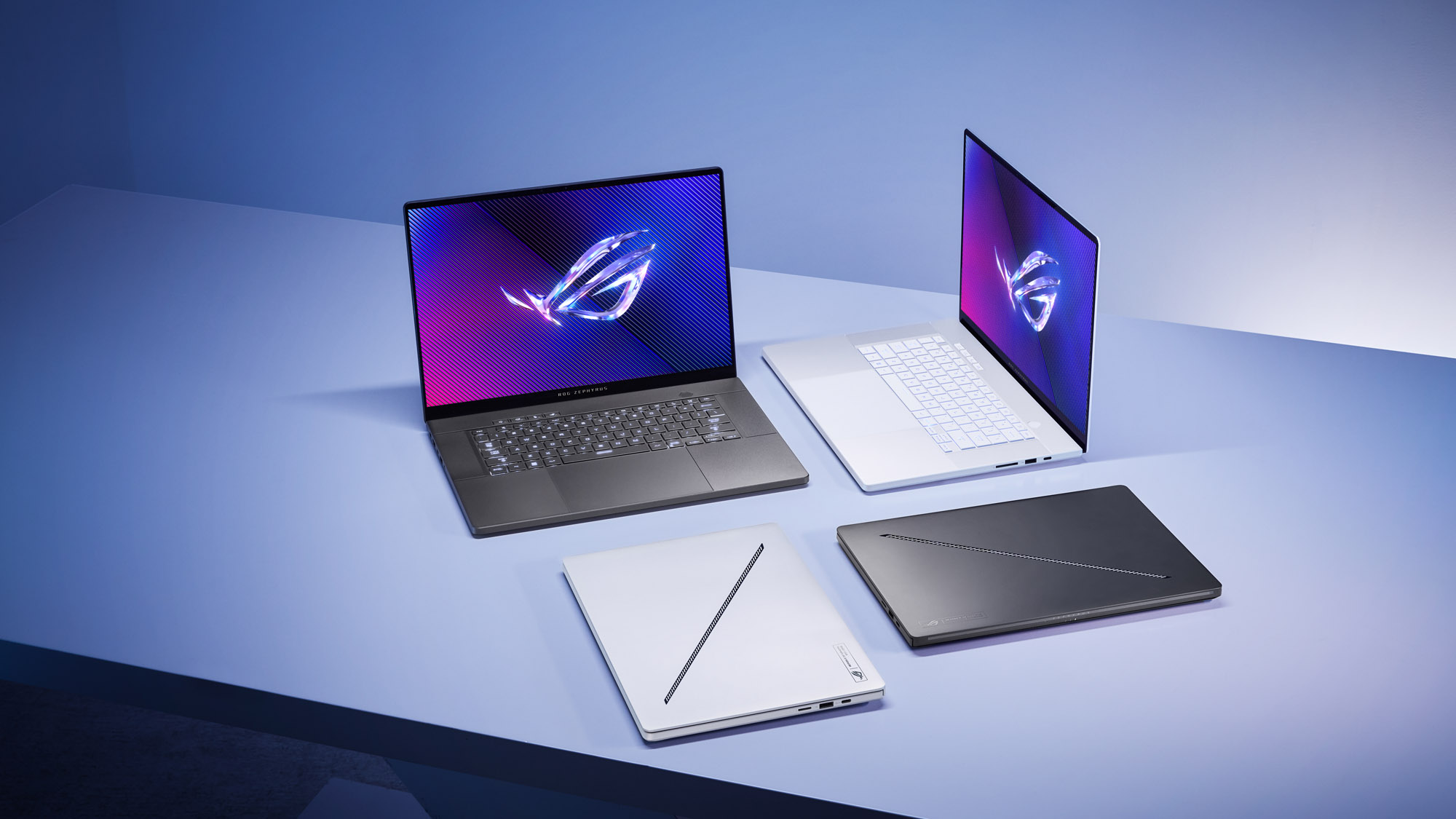
The ASUS ROG Zephyrus G14 has established itself as the benchmark for compact gaming laptops, offering a rare combination of serious gaming performance and true portability. Built around AMD's latest Ryzen processors and NVIDIA GeForce RTX graphics, this 14-inch machine punches well above its weight class while maintaining a premium CNC-milled aluminum construction that weighs as little as 1.5kg. The 120Hz OLED display delivers vibrant colors and smooth gameplay, while battery life exceeds expectations for a gaming-focused device. However, this compact form factor brings trade-offs, including thermal challenges under sustained load, non-upgradeable RAM, and fan noise during intensive gaming sessions.[3][4][5][6][1]
Pros
- Exceptional build quality with premium CNC-milled aluminum chassis and sophisticated design
- Outstanding OLED display with 120Hz refresh rate, 100% DCI-P3 color coverage, and G-Sync support
- Strong gaming and productivity performance from AMD Ryzen 9 processors and NVIDIA RTX 40/50-series GPUs
- Impressive battery life averaging 8 hours on office workloads, exceptional for a gaming laptop
- Highly portable design starting at 1.5kg, making it ideal for mobile gaming and content creation
Cons
- Significant heat generation during gaming sessions, with keyboard areas reaching uncomfortable temperatures
- Soldered RAM prevents future memory upgrades, limiting long-term expandability
- Audible fan noise under load, particularly in Turbo performance mode
- Some users report stability issues including crashes and GPU driver problems
- Limited brightness in SDR mode and PWM flickering on OLED panel may affect sensitive users
The ASUS ROG Zephyrus G14 has established itself as the benchmark for compact gaming laptops, offering a rare combination of serious gaming performance and true portability. Built around AMD's latest Ryzen processors and NVIDIA GeForce RTX graphics, this 14-inch machine punches well above its weight class while maintaining a premium CNC-milled aluminum construction that weighs as little as 1.5kg. The 120Hz OLED display delivers vibrant colors and smooth gameplay, while battery life exceeds expectations for a gaming-focused device. However, this compact form factor brings trade-offs, including thermal challenges under sustained load, non-upgradeable RAM, and fan noise during intensive gaming sessions.[3][4][5][6][1]
Design and Build Quality
The ASUS ROG Zephyrus G14 sets a new standard for gaming laptop construction with its precision CNC-milled aluminum chassis that feels every bit as premium as high-end ultrabooks. The unibody design eliminates flex and creaking, delivering a solid feel that inspires confidence whether tossed in a backpack or used as a daily driver. ASUS has refined the aesthetic across generations, moving away from gamer-centric designs toward a sophisticated look with subtle ROG branding that works equally well in corporate meetings and LAN parties. Available in platinum white and moonlight white colorways depending on the generation, the G14 maintains a professional appearance while housing serious gaming hardware.[6][1][11][4]
The keyboard features per-key RGB lighting with good travel and feedback, though some users report the upper portion becomes uncomfortably warm during extended gaming sessions. The large precision touchpad responds accurately to gestures and clicks, earning praise from reviewers for its smooth glass surface and reliable palm rejection. Build quality extends to the hinge mechanism, which opens smoothly and holds the display firmly at any angle without wobble. The attention to detail in construction justifies the premium positioning and distinguishes the G14 from plastic-bodied competitors in this size class.[8][1][4]
Performance in Real Use
Gaming performance exceeds expectations for a 14-inch form factor, with the AMD Ryzen 9 processors paired with NVIDIA RTX graphics delivering frame rates that rival larger 15-inch and 16-inch gaming laptops. The 2024 model with RTX 4070 handles AAA titles comfortably above 60fps at native 2880x1800 resolution, while the 2025 refresh with RTX 5070 Ti and RTX 5080 options pushes performance even higher. Testing with Cyberpunk 2077 at Ultra settings with ray tracing enabled achieved between 200-230fps with DLSS and frame generation active, demonstrating the headroom available for demanding titles.[1][5][2]
Thermal management presents the primary constraint on sustained performance, with the compact chassis limiting cooling capacity compared to larger gaming laptops. Under full load in Turbo mode, CPU and GPU temperatures climb to around 70°C for both components, though the system maintains stable clock speeds without significant throttling. The trade-off manifests as keyboard surface temperatures that some users find uncomfortably warm during intense gaming, particularly in the area above the function keys. Performance modes in ASUS's Armoury Crate software provide granular control, with Silent and Balanced modes reducing thermal output and fan noise at the expense of some performance.[17][9][5][2][4]
Productivity workloads benefit from the AMD Ryzen 9 architecture, with Geekbench 6 scores reaching 12,246 in the 2024 model, dominating the mainstream gaming laptop category average of 8,734. The neural processing unit integration in newer AMD chips enables AI-enhanced features and improved efficiency for creative applications. Content creators appreciate the combination of CPU grunt and dedicated GPU acceleration for video editing, 3D rendering, and photo processing tasks.[18][7][10]
Ease of Use
The G14 demonstrates exceptional usability for a gaming-focused device, booting quickly and responding instantly to inputs during everyday tasks. ASUS's software ecosystem centers on Armoury Crate, which consolidates performance profiles, RGB lighting controls, and system monitoring in a single interface, though some users find the application overwhelming and prefer third-party alternatives like G-Helper for simplified control. Advanced Optimus technology automatically switches between integrated and discrete graphics based on workload, optimizing battery life without requiring manual intervention.[8][2][4]
The port selection balances modern connectivity with legacy support, offering USB-C with DisplayPort output, multiple USB-A ports, HDMI 2.1, and a microSD card reader. The inclusion of both USB-C and barrel connector charging provides flexibility, with USB-C supporting lower-power operation and the 200W barrel charger enabling full performance. Display output options allow connection to multiple external monitors for productivity setups, with the MUX switch enabling direct GPU output to bypass Optimus for maximum gaming performance when needed.[19][8]
Some users report occasional system instabilities, including crashes during GPU mode switching and driver-related issues that can be resolved through DDU clean installations or reverting to specific NVIDIA driver versions. These problems appear to affect a minority of units but warrant consideration for users requiring absolute stability. The soldered RAM configuration limits future upgradability, requiring careful configuration selection at purchase to meet long-term needs.[13][8][4]
Reliability
Long-term reliability reports remain generally positive, with the aluminum construction proving durable against the wear of regular transport. The OLED display introduces considerations around burn-in risk with static content, though ASUS includes OLED care options in the software to mitigate this concern through pixel shifting and other protective measures. Battery health maintains well according to user reports, with the 73Wh capacity delivering strong endurance even after months of use.[9][2][8][4]
Component quality varies, with some early reports of coil whine, fan rattling, or buzzing in isolated units. These manufacturing defects appear to be exceptions rather than systemic issues, typically covered under warranty. The sealed design with soldered RAM and limited internal access means user serviceability is minimal beyond SSD upgrades, placing greater emphasis on selecting a configuration that will meet needs for the device's lifespan.[20][8][4]
Thermal longevity remains a question mark given the sustained high temperatures during gaming, though the robust cooling system with dual fans and heat pipes appears adequate for the hardware specifications. Users report stable performance without degradation over time, suggesting the thermal solution maintains effectiveness. Software updates from ASUS address driver stability and feature additions, though some users prefer clean Windows installations to eliminate bloatware.[5][9][13][8]
Use Cases
The G14 excels as a primary device for users who refuse to compromise between gaming performance and professional portability. Students and professionals who game appreciate the ability to take notes in class or attend meetings without the bulk and aesthetic of traditional gaming laptops, then switch seamlessly to AAA gaming in the evening. The lightweight construction starting at 1.5kg makes it practical for daily commutes and travel, fitting easily into standard backpacks alongside textbooks or work materials.[10][6][1][4]
Content creators find the combination of color-accurate OLED display, powerful CPU, and dedicated GPU acceleration ideal for video editing and photo processing on location. The Pantone-validated screen ensures color accuracy for professional work, while the 100% DCI-P3 coverage provides the gamut needed for HDR content creation. Battery life averaging 8 hours on productivity workloads supports full workdays away from power outlets, a standout capability for a gaming laptop.[7][18][9][1][8]
Competitive gamers benefit from the 120Hz OLED panel with G-Sync support, delivering smooth motion and eliminating screen tearing. The high refresh rate paired with low response times provides the responsiveness needed for esports titles, while the powerful GPU ensures frame rates exceed the display's refresh rate in most competitive games. The compact footprint fits comfortably on smaller desks or LAN party setups where space is limited.[12][7][10][1][5]
Long-Term Ownership Feedback
Owners report sustained satisfaction with the G14's performance and build quality over extended use periods. The premium construction maintains its appearance without showing significant wear, with the aluminum finish resisting scratches and dents better than plastic alternatives. The keyboard's RGB backlighting and keycaps retain their clarity and responsiveness without developing the shine or mushiness that afflicts lesser keyboards.[9][8][4]
Battery degradation appears minimal based on user reports, with devices maintaining strong endurance even after a year of daily use. The exceptional battery life for a gaming laptop remains a consistent praise point, enabling genuine portability for productivity tasks. Some users note that the OLED panel continues to deliver stunning image quality without visible burn-in when OLED care features are utilized.[2][9][8][4]
The primary long-term limitation stems from the non-upgradeable RAM, which may constrain users as software demands increase over time. The 16GB base configuration suffices for current gaming and productivity needs, but power users should opt for 32GB models at purchase. Storage upgrades remain possible through the accessible M.2 slot, providing a path to expand capacity as game install sizes continue growing.[8][4]
Community support through forums and Reddit remains active, with users sharing optimization tips, driver solutions, and configuration advice. This ecosystem of knowledge helps owners maximize their G14's potential and troubleshoot issues when they arise. The combination of solid hardware, premium construction, and engaged community positions the G14 as a device that maintains its value and utility well beyond the initial purchase.[13][9][4]
| Specification | Details |
|---|---|
| Processor | AMD Ryzen 9 8945HS / Ryzen AI 9 HX 370 (2025 model) [7][2] |
| Graphics | NVIDIA GeForce RTX 4060/4070 (2024) or RTX 5070 Ti/5080 (2025) [7][2] |
| Display | 14-inch OLED, 2880x1800 (3K), 120Hz, 100% DCI-P3, Pantone Validated [7] |
| Memory | 16GB or 32GB LPDDR5X (soldered, non-upgradeable) [4][7] |
| Storage | 512GB to 1TB PCIe 4.0 NVMe SSD [7] |
| Weight | Starting at 1.5kg (3.3 lbs) [10][6] |
| Battery | 73Wh with Advanced Optimus GPU switching [2] |
| Chassis Material | CNC-milled aluminum unibody construction [1][6] |
| Neural Processor | AMD XDNA NPU up to 16 TOPS [7] |
| Connectivity | Wi-Fi 6E, USB-C with DisplayPort, USB-A, HDMI 2.1, microSD card reader [8] |
Buy
- You need a powerful gaming laptop that can easily travel without weighing down your bag[6](https://press.asus.com ews/press-releases/rog-zephyrus-g14-g16-2026/)[10]
- You value premium build quality and sophisticated aesthetics suitable for professional environments[1][4]
- You want exceptional battery life for productivity work between gaming sessions[9][8]
- You prioritize display quality and want the vibrant colors and deep blacks of OLED technology[7][1]
- You need strong performance for both AAA gaming and creative applications in a compact footprint[5][2]
Skip
- You plan to upgrade components over time, as RAM is soldered and upgrade options are limited[4][8]
- You're sensitive to fan noise or need a silent laptop for quiet environments[12][11]
- You prefer gaming on battery without thermal concerns or performance throttling[3][4]
- You require maximum gaming performance without thermal constraints of a compact chassis[4][5]
- You're concerned about OLED burn-in risk with static content or extended desktop use[2]
Critic Reviews
No reviews yet.
User Reviews
No reviews yet.