
Dell XPS 13
The latest XPS 13 combines Intel's Lunar Lake processors with exceptional battery life and a stunning OLED display, though its minimal port selection and redesigned input methods create usability challenges
Updated January 28, 2026
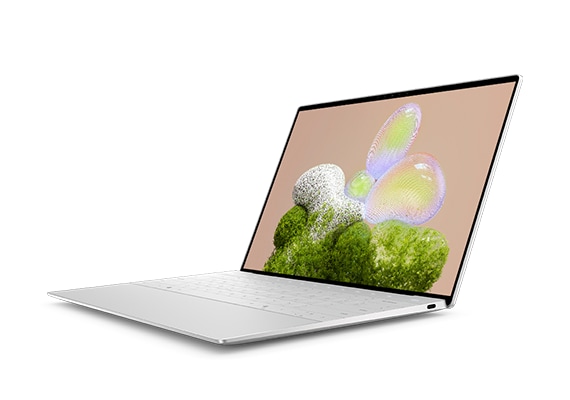
The Dell XPS 13 represents one of the most refined ultraportable Windows laptops available, with recent models featuring Intel's Lunar Lake processors delivering remarkable battery life that extends beyond 18 hours. The laptop's tandem OLED display option stands out as a vivid, high-quality screen suitable for both productivity and content creation. Dell has maintained its premium build quality and minimalist aesthetic while keeping the chassis under 13mm thin and approximately 2.6 pounds. However, the XPS 13's controversial redesign introduces friction points including an invisible haptic trackpad, capacitive touch function bar, and extremely limited port selection with only two USB-C Thunderbolt 4 ports. These design decisions, while visually striking, compromise the practical usability that made earlier XPS 13 generations universally praised.[1][2][3][4][5][6][7][8]
Pros
- Exceptional battery life reaching 18-23 hours in real-world testing, among the best in its class
- Stunning tandem OLED display with 100% DCI-P3 color coverage and anti-reflective coating suitable for color-critical work
- Solid performance from Intel Core Ultra Series 2 processors handling multitasking and productivity workloads efficiently
- Premium build quality with durable metallic exterior that resists scratches and maintains structural integrity
- Quad-speaker audio system delivers impactful sound quality for an ultraportable laptop
Cons
- Only two USB-C ports severely limits connectivity and requires dongles or docks for most users
- Haptic trackpad with invisible edges causes accidental clicks and inconsistent force feedback
- Capacitive touch function bar lacks tactile feedback and creates accessibility issues
- Cramped keyboard layout with reduced key spacing compared to traditional designs
- Soldered RAM prevents future upgrades, limiting long-term expandability
The Dell XPS 13 represents one of the most refined ultraportable Windows laptops available, with recent models featuring Intel's Lunar Lake processors delivering remarkable battery life that extends beyond 18 hours. The laptop's tandem OLED display option stands out as a vivid, high-quality screen suitable for both productivity and content creation. Dell has maintained its premium build quality and minimalist aesthetic while keeping the chassis under 13mm thin and approximately 2.6 pounds. However, the XPS 13's controversial redesign introduces friction points including an invisible haptic trackpad, capacitive touch function bar, and extremely limited port selection with only two USB-C Thunderbolt 4 ports. These design decisions, while visually striking, compromise the practical usability that made earlier XPS 13 generations universally praised.[1][2][3][4][5][6][7][8]
Design and Build Quality
The Dell XPS 13 maintains its reputation for premium construction with a metallic chassis that resists scratches and maintains structural integrity through extended use. The current generation measures under 13mm in thickness and weighs approximately 2.6 pounds, making it one of the lightest ultraportables available. Dell's minimalist aesthetic features the signature InfinityEdge display with ultra-slim bezels that maximize screen real estate within a compact footprint.[3][8][15][9]
The chassis construction uses machined aluminum that feels solid during handling without flexing under pressure. Long-term owners report the exterior holds up well against daily wear, though the interior palm rest collects fingerprints and requires regular cleaning. The laptop's hinge mechanism operates smoothly and maintains screen position reliably throughout the device's lifespan.[16][9]
However, Dell's redesign introduces controversial input methods that sacrifice practicality for visual coherence. The edge-to-edge glass trackpad lacks visible boundaries, creating confusion about clickable areas and causing frequent accidental inputs. The capacitive touch function row replaces physical F-keys with a flat touch bar that provides no tactile feedback, making blind operation nearly impossible. These design choices prioritize appearance over ergonomics in ways that frustrate daily users.[13][12][2][5]
Performance in Real Use
The Intel Core Ultra Series 2 processors deliver responsive performance for productivity workloads including multitasking across multiple applications and virtual desktops. Single-core performance matches or exceeds competing Snapdragon X Elite and AMD Ryzen AI processors in benchmark testing. The integrated Intel Arc graphics handle light creative work and casual gaming at 1080p resolution, though sustained heavy workloads reveal thermal throttling limitations.[6][2][4][5]
Real-world testing shows the XPS 13 handles over 20 Chrome browser tabs simultaneously while running background downloads and light Photoshop editing without noticeable slowdown. PCMark 10 scores of 6,827 and Crossmark overall scores of 1,839 demonstrate solid capability for everyday computing tasks. The laptop stays cool and quiet under load, with thermal management improved significantly over previous generations using Intel's earlier processors.[2][4][5][6]
Multicore performance lags behind H-series processors and desktop replacement laptops, as expected from efficiency-focused mobile chips. Users running sustained rendering, compilation, or video encoding workloads will encounter performance limitations compared to more powerful alternatives. The 16GB or 32GB LPDDR5X RAM configuration handles memory-intensive applications adequately, though the soldered design prevents future upgrades.[10][15][4][6][2]
Ease of Use
The XPS 13's usability presents a mixed experience centered around its redesigned input methods. The keyboard features edge-to-edge keycaps with reduced spacing that requires adaptation for users accustomed to traditional layouts. Key travel feels comfortable and responsive once adapted, though the cramped layout increases typing errors during the adjustment period.[14][17][5][6]
The invisible haptic trackpad generates significant user frustration with inconsistent click force requirements and unintended activations. Users report the trackpad registers clicks during cursor movement, causing accidental desktop rearrangements and text selection issues. The haptic feedback lacks the precision of traditional mechanical trackpads, with some users eventually resorting to external mice for reliable input. Dell's touchpad firmware updates attempt to address corner dead zones, but fundamental usability concerns persist.[24][12][9][5]
Port limitations create daily inconvenience for users connecting multiple peripherals. With only two USB-C Thunderbolt 4 ports and one typically occupied by charging, users rely on dongles or docking stations to connect monitors, external drives, and USB-A accessories. This necessitates carrying adapters when working in different locations, undermining the laptop's ultraportable design advantage.[23][11][7]
Reliability
Long-term reliability reports reveal inconsistent quality control across XPS 13 generations. Some users experience hardware issues from initial purchase including microphone failures, random shutdowns, and display problems. The most concerning reliability issue involves unexpected system crashes while plugged in, with blue screen errors indicating critical failures unrelated to battery depletion.[18][9]
Battery degradation emerges as a recurring concern in extended ownership reports. One documented case shows battery capacity declining 45 percent within months of purchase, reducing runtime from all-day capability to 2.5 hours. Keyboard reliability also deteriorates over time for some units, with top row keys becoming unresponsive and dramatically reducing typing speed. These failures occurring within the one-year warranty period highlight quality control vulnerabilities.[18][9]
Dell's support response to reliability issues receives criticism from users facing problems after warranty expiration. The company's policy requiring payment for technical support beyond the initial warranty period frustrates owners dealing with early failures. However, many users report trouble-free operation over extended periods, suggesting reliability varies significantly between individual units.[9][18]
Use Cases
The XPS 13 excels as a mobile productivity machine for professionals requiring all-day battery life away from power outlets. Its 18-23 hour runtime in real-world testing makes it ideal for long flights, full workdays, and users prone to forgetting chargers. The lightweight 2.6-pound design suits frequent travelers and students carrying laptops between classes or meetings.[8][17][6][2]
Content creators working with color-sensitive material benefit from the OLED display's 100 percent DCI-P3 coverage and accurate color reproduction. The 2.8K resolution provides sufficient detail for photo editing and design work, though the 400-nit brightness limitation may challenge outdoor use. The quad-speaker system delivers surprisingly impactful audio quality for multimedia consumption and video conferencing.[14][10][1][4][6]
The XPS 13 suits users embracing AI-powered workflows with its Copilot+ ready NPU acceleration for on-device machine learning tasks. Students and professionals handling standard office productivity, web browsing, and communication tools find the performance adequate for daily requirements. However, the limited port selection and input method compromises make the XPS 13 less suitable for users requiring extensive peripheral connectivity or traditional tactile interfaces.[15][17][21][11][5][7][2]
Long-Term Ownership Feedback
Extended ownership experiences reveal the XPS 13's strengths and weaknesses emerging over months of use. The premium build quality holds up well physically, with the aluminum chassis maintaining structural integrity and showing minimal cosmetic wear despite regular transportation. Users appreciate the laptop's consistent performance for everyday tasks throughout ownership.[9]
However, trackpad accuracy declines over time for some units, with gesture recognition and scrolling becoming progressively less reliable. This deterioration eventually drives users to external input devices to maintain productivity. Battery capacity degradation represents a significant concern, with some units losing nearly half their original capacity within the first year. This transforms the XPS 13's signature all-day battery life into a device requiring multiple daily charges.[9]
Users who adapt successfully to the invisible trackpad and capacitive function row report satisfaction with the overall package. The combination of lightweight portability, strong battery life, and vibrant display creates positive long-term experiences for owners whose workflows align with the laptop's strengths. The key to satisfactory long-term ownership involves understanding and accepting the XPS 13's design trade-offs before purchase, particularly regarding port limitations and non-traditional input methods.[17][21][11][5]
| Specification | Details |
|---|---|
| Processor | Intel Core Ultra 5 226V, Core Ultra 7 256V/258V, Core Ultra 9 288V (Lunar Lake) [10] |
| RAM | 16GB or 32GB LPDDR5X 8533 MT/s (soldered, non-upgradeable) [10][15] |
| Storage | 512GB to 4TB M.2 2280 PCIe Gen 4 SSD (user-replaceable) [4][15] |
| Display | 13.4-inch InfinityEdge: FHD+ (1920×1200) IPS or 2.8K (2880×1800) OLED touchscreen, 400 nits, 100% DCI-P3 [15][4] |
| Graphics | Intel Arc Graphics (140V, 7-8 cores integrated) [10][15] |
| Ports | 2× Thunderbolt 4 USB-C with DisplayPort 2.1 and Power Delivery [15][10] |
| Wireless | Intel Killer Wi-Fi 7 BE201 2×2, Bluetooth 5.4 [10][15] |
| Battery | 55Wh 3-cell integrated [10][15] |
| Dimensions | Under 13mm thick, approximately 2.6 pounds [3][8] |
| Camera | FHD 1080p RGB webcam with Windows Hello, 360p IR camera [10][15] |
Buy
- You prioritize all-day battery life and need a laptop that lasts through extended work sessions without charging[2][6]
- You require a lightweight, portable machine under 2.6 pounds for frequent travel[3][8]
- You work with color-sensitive content and need accurate display reproduction with DCI-P3 coverage[1][4]
- You value premium aesthetics and build quality in a minimalist design[16][8]
- You need a Copilot+ ready machine with NPU acceleration for AI workloads[15][2]
Skip
- You connect multiple peripherals and need diverse port options beyond two USB-C ports[11][7]
- You prefer traditional tactile keyboards and trackpads with clear physical boundaries[5][12](https://www.reddit.com/r/Dell/comments/1h4fjpz ew_xps_13_9350_touchpad_issue/)
- You require user-upgradeable RAM for future expandability[4][15]
- You need consistent high-performance for sustained heavy workloads rather than efficiency-focused processors[7][4]
- You have experienced quality control issues with Dell's recent XPS lineup and prefer more reliable alternatives[17][18]
Critic Reviews
No reviews yet.
User Reviews
No reviews yet.