
Dell XPS 13 2-in-1
A premium convertible laptop that excels in design and display quality but sacrifices performance and battery life for portability, making it ideal for light productivity work rather than intensive computing tasks.
Updated January 28, 2026
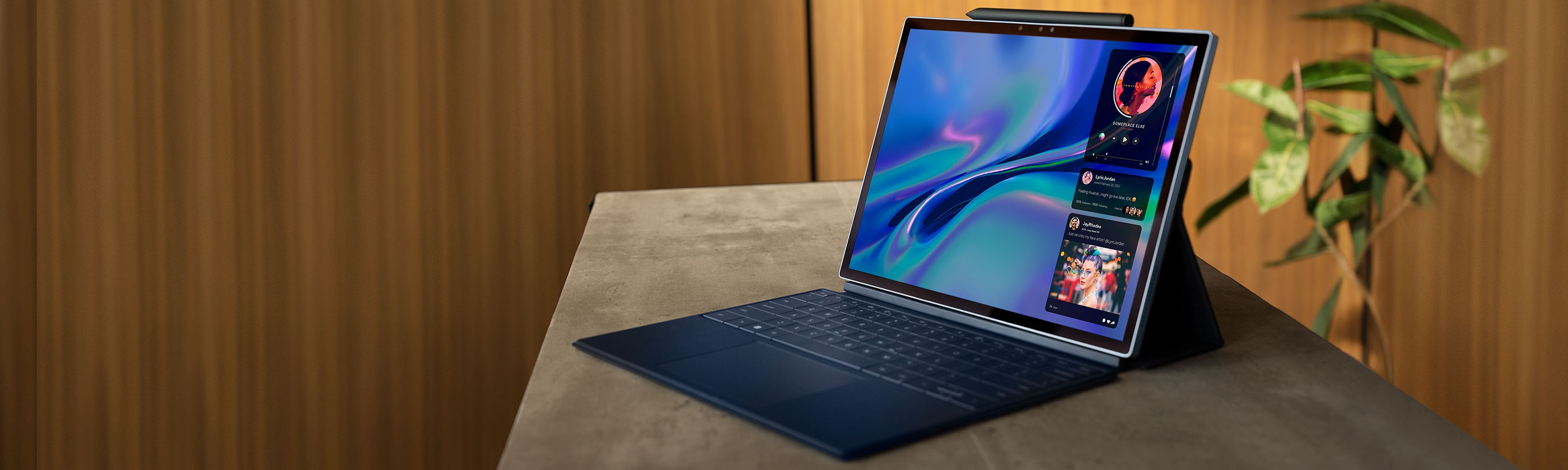
The Dell XPS 13 2-in-1 represents Dell's effort to deliver premium convertible computing in an ultraportable form factor. Across multiple generations, this line has evolved from a traditional 360-degree hinge design to a detachable tablet format similar to Microsoft's Surface Pro. Professional reviewers consistently praise the stunning display quality, exceptional build craftsmanship, and slim profile that makes it one of the most portable 2-in-1s available. However, the pursuit of thinness comes with trade-offs, including limited port selection, middling battery performance on recent models, and reduced processing power compared to traditional laptop designs. The device shines for users prioritizing portability and display quality for everyday productivity, but struggles to meet the needs of power users or those requiring all-day untethered operation.[1][2][3][4][5][6][7][8]
Pros
- Premium build quality with aluminum chassis and minimal bezels that remains pristine over extended use
- Exceptional display options including 4K, OLED, and high-resolution 2880×1920 IPS panels with excellent color accuracy
- Ultraportable design weighing approximately 2.7 pounds with a slim profile that fits easily in bags
- Responsive touchscreen and excellent pen support with 4,096 pressure levels and Tile tracking functionality
- Superior webcam quality including IR camera for Windows Hello authentication
Cons
- Limited port selection with only two USB-C ports and no USB-A or HDMI without adapters
- Battery life ranges from mediocre to below average on most models, often failing to last a full workday under heavy use
- Lower-powered processors in pursuit of fanless design limit performance for demanding tasks
- Coil whine reported across multiple generations as a persistent quality issue
- Premium accessories like the XPS Folio keyboard and stylus sold separately, increasing total cost
The Dell XPS 13 2-in-1 represents Dell's effort to deliver premium convertible computing in an ultraportable form factor. Across multiple generations, this line has evolved from a traditional 360-degree hinge design to a detachable tablet format similar to Microsoft's Surface Pro. Professional reviewers consistently praise the stunning display quality, exceptional build craftsmanship, and slim profile that makes it one of the most portable 2-in-1s available. However, the pursuit of thinness comes with trade-offs, including limited port selection, middling battery performance on recent models, and reduced processing power compared to traditional laptop designs. The device shines for users prioritizing portability and display quality for everyday productivity, but struggles to meet the needs of power users or those requiring all-day untethered operation.[1][2][3][4][5][6][7][8]
Design and Build Quality
The Dell XPS 13 2-in-1 establishes itself immediately through premium materials and meticulous attention to detail. The aluminum chassis features a brushed finish that resists fingerprints and maintains its appearance over extended periods, with long-term users reporting no visible scuffs or scratches after years of regular use. Dell's signature InfinityEdge display design pushes the screen to the very edges of the chassis, creating a virtually borderless appearance with bezels measuring just 0.20 inches. This aggressive bezel reduction allows Dell to fit a 13-inch display into a footprint typically associated with 11-inch devices.[9][11][4][2]
The convertible design has evolved significantly across generations. Earlier models like the 7390 and 9310 employed a traditional 360-degree hinge mechanism that allowed the display to fold completely backward for tablet mode while maintaining the keyboard connection. More recent iterations, specifically the 9315 model, transitioned to a detachable tablet format that separates completely from the keyboard accessory, directly competing with Microsoft's Surface Pro lineup. The detachable design reduces overall weight but requires the separately-purchased XPS Folio keyboard accessory to function effectively as a laptop.[15][8][2][5]
Build quality receives consistent praise from professional reviewers, with terms like "top-rate" and "excellent" appearing repeatedly across multiple generations. The chassis exhibits minimal flex, and the hinge mechanism on convertible models operates smoothly without wobble. However, the pursuit of thinness measuring between 0.35 and 0.59 inches introduces structural compromises that manifest in persistent coil whine across multiple model years, a complaint documented by both professional reviewers and end users.[19][4][2][14]
Performance in Real Use
Processing capabilities vary significantly depending on model generation and intended use case. The device employs lower-power U-series Intel processors rather than the more powerful H-series chips found in traditional laptops, a deliberate choice enabling fanless operation in most configurations. Models equipped with 11th Generation Intel Core i7-1165G7 processors and Iris Xe graphics deliver strong performance for productivity applications, with benchmark scores significantly exceeding competing devices like the HP Spectre x360 and Lenovo Yoga C940. The 2025 refresh incorporating Intel Core Ultra Lunar Lake processors demonstrates further performance improvements while maintaining efficiency.[4][3][1][10]
For everyday computing tasks including web browsing, document editing, and media consumption, the XPS 13 2-in-1 performs admirably with responsive application launching and smooth multitasking. Users working in development environments report satisfactory experiences running text editors, terminals, and multiple browser tabs simultaneously. The combination of fast SSD storage and adequate RAM allocation ensures snappy system responsiveness during typical workloads.[3][4][7][14]
Performance limitations emerge when attempting intensive computing tasks. The lower-power processors struggle with demanding applications like video editing, 3D rendering, and native gaming, producing frame rates and render times notably inferior to traditional laptop designs. Professional reviewers specifically note that users planning "high-end multimedia or design work" should consider alternatives with more powerful processors. The thermal management succeeds in maintaining quiet operation but achieves this through performance throttling rather than active cooling solutions.[1][3]
Ease of Use
The typing experience varies depending on the specific model configuration. The 7390 generation features Dell's controversial maglev keyboard that eliminates traditional key switches in favor of magnetic levitation technology. While some users appreciate the unique tactile feedback described as "pseudo-mechanical," others find the implementation contentious. The detachable XPS Folio keyboard on the 9315 model provides more conventional key travel with solid tactile feedback despite shallow actuation depth necessitated by the thin profile. Users consistently achieve typing speeds and accuracy rates matching or exceeding their normal performance, though some report key stiffness and bottoming out during extended typing sessions.[13][2][5][14]
Touchpad implementation receives widespread acclaim across all generations. Dell incorporates oversized glass touchpads with Windows Precision drivers, delivering smooth scrolling and accurate gesture recognition. The glass surface maintains its smoothness even after years of use, showing no signs of wear or degradation. The 2-in-1 form factor enables multiple interaction methods including traditional mouse input, direct touch on the display, and optional stylus input.[9][5][13]
Touchscreen responsiveness earns consistent praise from both professional reviewers and end users. The capacitive multi-touch displays respond instantly to finger input and support the optional XPS Stylus with 4,096 pressure levels for precise drawing and note-taking. The stylus includes programmable buttons and built-in Tile tracking functionality to prevent loss. Windows Hello integration through the IR camera enables fast, reliable biometric authentication, though some users report occasional fingerprint reader unreliability.[17][13][3][1]
Reliability
Long-term reliability presents a mixed picture with significant variation between individual units. Users who receive well-manufactured units report excellent durability with hardware holding up through years of daily use without mechanical failures. The aluminum chassis resists denting and scratching, while the glass touchpad maintains performance characteristics over extended periods.[18][9]
Quality control inconsistencies emerge as a significant concern based on customer feedback. Multiple users document serious reliability issues manifesting within weeks of purchase, including screen blackouts, system freezes, and complete component failures. One user reported requiring two complete device replacements within the first few months of ownership, with the replacement unit failing after just four months of use. These early-life failures necessitate multiple service calls and often result in component replacements that fail to resolve underlying issues.[18]
Coil whine represents the most frequently cited persistent quality issue across multiple model generations. The high-pitched electronic noise emanates from power regulation circuitry and varies in intensity depending on workload and power state. While not affecting functionality, the audible interference proves distracting in quiet environments and appears consistently even across warranty replacement units. Some users describe their units as having "the worst coil whine of all XPS devices" they have experienced.[2][14]
Dell's warranty support receives criticism for slow response times and inadequate solutions. Users report multiple remote support sessions, diagnostic procedures, and component replacements that fail to resolve recurring issues. The process of obtaining warranty replacements proves lengthy and frustrating, with customers facing unclear timelines and requests to continue monitoring problems rather than receiving immediate replacements.[18]
Use Cases
The XPS 13 2-in-1 excels in scenarios prioritizing portability and display quality over raw computing power. Business professionals conducting presentations, reviewing documents, and participating in video conferences benefit from the sharp display, excellent webcam system, and professional aesthetic. The optional 5G connectivity on select models supports truly mobile workflows for users requiring consistent internet access while traveling.[8][4][7][3][1]
Students and knowledge workers performing research, note-taking, and content consumption find the 2-in-1 form factor particularly versatile. The ability to transition between laptop mode for typing and tablet mode for reading or annotating documents with the stylus creates workflow flexibility. The high-resolution display proves valuable for users working with detailed content where readability at small text sizes matters.[12][13][14][3]
Creative professionals working in review and approval capacities rather than content creation leverage the color-accurate display and tablet functionality effectively. The device handles tasks like photo review, design mockup evaluation, and collaborative feedback sessions capably. However, the limited processing power makes the device unsuitable for intensive creative work like video editing, 3D modeling, or complex photo manipulation.[12][14][3][1]
The device proves less suitable for users requiring sustained high-performance computing. Software developers working with resource-intensive development environments, data analysts processing large datasets, and content creators rendering video or 3D assets encounter performance limitations. The restricted port selection complicates workflows requiring multiple simultaneous peripheral connections.[17][7][3][1]
Long-Term Ownership Feedback
Users maintaining their devices beyond the initial warranty period report generally positive experiences with physical durability. The aluminum construction withstands the rigors of daily commuting and regular transport without developing structural issues. The display coating resists scratching, and the overall aesthetic maintains its premium appearance over time.[21][9]
Battery capacity degradation follows typical lithium-ion patterns, with users noting gradual reductions in runtime over multiple years of use. The initially mediocre battery life on many models becomes more problematic as the battery ages, requiring more frequent charging sessions. Users prioritizing longevity may need to budget for eventual battery replacement to maintain usability.[9][7][3]
Software support and driver updates proceed smoothly for most users, with Dell providing regular firmware updates and driver patches. The mainstream Intel processor architecture ensures compatibility with current and future Windows versions. However, some users report that Windows updates occasionally introduce temporary compatibility issues requiring troubleshooting.[4][9][18]
The secondary market value of XPS 13 2-in-1 models remains relatively strong compared to competing ultraportables, reflecting the brand prestige and build quality. Users upgrading to newer models report reasonable resale prices when selling previous-generation units. However, the rapid evolution of the product line with significant design changes between generations can make older models seem outdated more quickly than competitors maintaining more consistent industrial design.[21][8][5][9]
| Specification | Details |
|---|---|
| Display | 13-13.4 inches, options include FHD+ (1920×1200), 3K (2880×1920), 4K UHD+ (3840×2400), OLED variants available [1][10][4] |
| Processor | Intel Core i5/i7 (10th-12th Gen U-series), Intel Core Ultra (Lunar Lake) in 2025 models [3][4][10] |
| RAM | 8GB, 16GB, or 32GB LPDDR4x/DDR5 depending on generation [1][4] |
| Storage | 256GB, 512GB, or 1TB M.2 PCIe NVMe SSD [1][4] |
| Graphics | Intel Iris Xe integrated graphics [3][4] |
| Ports | 2× USB-C (one with Thunderbolt 3/4), microSD card reader [1][15] |
| Weight | Approximately 2.7-2.9 pounds depending on configuration [11][3] |
| Battery | 49.5Wh-51Wh, 45W USB-C charging [7][1] |
| Connectivity | Wi-Fi 6/6E, Bluetooth 5.1/5.2, optional 4G LTE/5G on select models [1][8] |
| Design | Convertible 360-degree hinge (older models) or detachable tablet with magnetic folio keyboard (9315+) [5][8] |
Buy
- You prioritize display quality and need a sharp, color-accurate screen for content consumption or creative review work[4][10]
- Portability is essential and you need a lightweight device that transitions easily between laptop and tablet modes[11][3]
- You work primarily with productivity applications and web-based tools rather than intensive software[7][1]
- The premium aesthetic and build quality align with professional appearance requirements[2][4]
- You need 5G connectivity for work on the go with select models offering built-in cellular support[8][1]
Skip
- You require multiple legacy ports or frequently connect external displays and peripherals[10][7]
- Battery longevity is critical and you need a device that reliably lasts through long workdays without charging[3][7]
- Your workflow involves demanding applications like video editing, 3D rendering, or gaming[1][3]
- You prefer a traditional clamshell laptop design with a permanently attached keyboard[5][8]
- Budget is a primary concern, as the device plus necessary accessories commands premium pricing[13][2]
Critic Reviews
No reviews yet.
User Reviews
No reviews yet.