
Lenovo IdeaPad Slim 3i Chromebook 14
A budget-friendly Chromebook that excels in portability and endurance, though limited by modest specifications and underwhelming audio quality for intensive multitasking needs.
Updated January 28, 2026
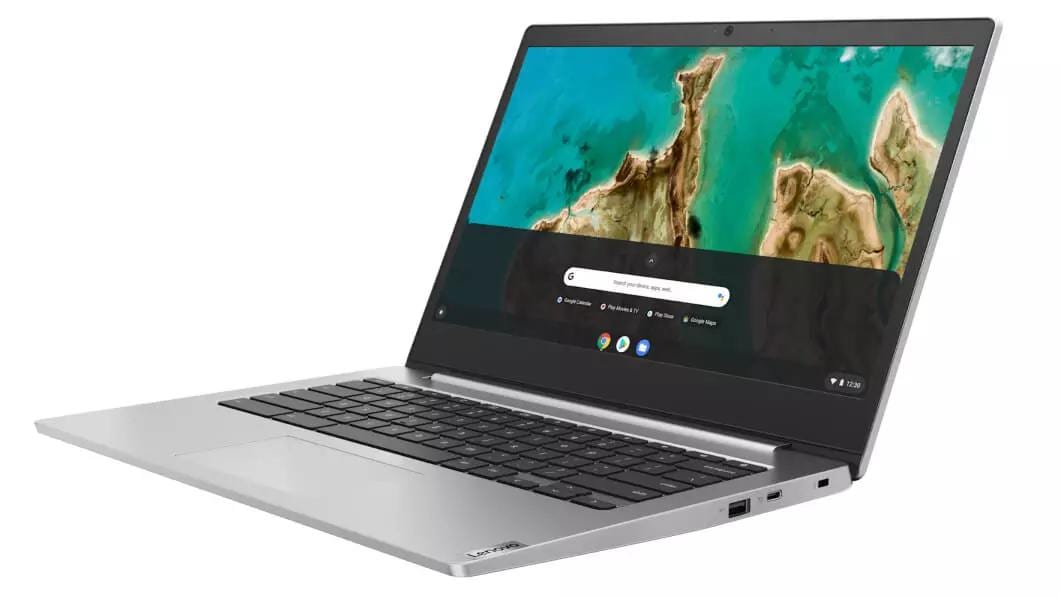
The Lenovo IdeaPad Slim 3i Chromebook 14 represents a balanced approach to budget computing, prioritizing reliability and longevity over raw performance. This 14-inch Chrome OS device targets students, remote workers, and casual users who need a dependable machine for web browsing, document editing, and media consumption. The laptop stands out with its exceptional battery life exceeding 11 hours, bright 1080p display options, and lightweight construction at 1.5kg. While the Intel N-series processors handle everyday tasks competently, users seeking heavy multitasking or demanding applications will encounter performance limitations. The device offers multiple configurations ranging from basic Intel N100 models to the more capable Core i3-N305 variant with up to 8GB RAM and 256GB storage.[1][2][3]
Pros
- Outstanding battery life exceeding 11-12 hours for typical workday use without requiring frequent charging
- Bright FHD IPS display reaching 329 cd/m² that performs well in most indoor lighting conditions
- Excellent 1080p webcam with sharp image quality and physical privacy shutter for video conferencing
- Lightweight and portable design at 1.5kg with compact dimensions ideal for mobility
- Wi-Fi 6E connectivity providing fast wireless performance for modern network environments
Cons
- Limited RAM configurations with maximum 8GB causing slowdowns during heavy multitasking
- Small touchpad with mediocre tracking responsiveness, particularly along right edge
- Tinny speaker quality with minimal bass and unnatural sound output despite high volume capability
- Slow eMMC storage performance impacting boot times and file transfers
- Mushy keyboard feel with scratchy actuation feedback that may cause typing fatigue
The Lenovo IdeaPad Slim 3i Chromebook 14 represents a balanced approach to budget computing, prioritizing reliability and longevity over raw performance. This 14-inch Chrome OS device targets students, remote workers, and casual users who need a dependable machine for web browsing, document editing, and media consumption. The laptop stands out with its exceptional battery life exceeding 11 hours, bright 1080p display options, and lightweight construction at 1.5kg. While the Intel N-series processors handle everyday tasks competently, users seeking heavy multitasking or demanding applications will encounter performance limitations. The device offers multiple configurations ranging from basic Intel N100 models to the more capable Core i3-N305 variant with up to 8GB RAM and 256GB storage.[1][2][3]
Design and Build Quality
The Lenovo IdeaPad Slim 3i Chromebook 14 employs a hybrid construction featuring aluminum for the lid and keyboard deck paired with a plastic bottom chassis. This approach keeps weight down to 1.5kg while maintaining structural integrity within budget constraints. The laptop measures 324.4 x 216.2mm with a 19.3mm profile, creating a footprint that feels notably compact for a 14-inch device, particularly in front-to-back depth. The two-tone lid incorporates subtle branding without excessive flourishes, while some models feature a textured finish combining smooth and raised bump surfaces .[2][1]
Build quality assessment reveals both strengths and compromises typical of budget devices. The aluminum components exhibit scratch and fingerprint resistance, though the materials communicate their cost-effective origins through tactile feedback. Reviewers note considerable flex in the lid, keyboard deck, and display when pressure is applied, with the entire chassis showing noticeable bending when lifted from one side. Small gaps between the display panel and bezels indicate manufacturing tolerances prioritizing affordability over precision. The hinges operate smoothly across their range, allowing the screen to tilt nearly flat for content sharing, though they require two-handed opening due to resistance levels.[1]
The Storm Grey color option maintains a professional appearance suitable for educational and business environments. Thick bezels at the top and bottom frame the display, while side bezels remain acceptably thin for the class. Ventilation ports position near the rear underside, with speakers firing downward from the front edge. The overall aesthetic prioritizes practicality and portability over premium materials or distinctive design language.[11][2][1]
Performance in Real Use
The IdeaPad Slim 3i Chromebook offers multiple Intel processor configurations from the Alder Lake-N series, spanning the quad-core N100 and N200 up to the eight-core i3-N305. These efficiency-focused chips operate without Hyper-Threading and target light computing workloads rather than intensive applications. Daily tasks including web browsing, document editing through Google Workspace, email management, and media streaming proceed smoothly on all configurations. The Core i3-N305 variant provides the most headroom for concurrent applications, reducing slowdowns when multiple browser tabs and Android apps run simultaneously.[2][1]
Performance limitations emerge with demanding multitasking scenarios. Users report perceptible lag when loading complex web pages or switching between numerous active tabs, particularly on models equipped with 4GB RAM . Benchmark results place the Chromebook behind Intel Core or AMD Ryzen alternatives, with PCWorld recording CrXPRT 2 scores of 73 and Speedometer results of 29.6 . These figures indicate adequate responsiveness for Chrome OS environments but confirm constraints when pushing workload boundaries .[1]
The integrated Intel UHD Graphics handle video playback and casual Android gaming from the Google Play Store competently. More demanding titles require resolution reductions to maintain playable frame rates, and the 60Hz display refresh rate limits gaming experiences. Storage performance represents a significant bottleneck, with eMMC drives delivering slow read and write speeds that extend boot times and file transfer operations. The laptop maintains cool and quiet operation even under sustained load, with keyboard temperatures remaining comfortable and fan noise barely registering.[1]
Ease of Use
The keyboard layout provides generous spacing across island-style keys that facilitate quick adaptation. Key travel measures adequate for the category, though the actuation feels mushy rather than crisp, with a scratchy feedback sensation during typing. Operating force skews toward the higher end of the spectrum, potentially causing hand fatigue during extended writing sessions. Typing noise remains minimal and suitable for quiet environments, though users who rely on auditory feedback may find the subdued sound unsatisfying. Four-level white backlight adjustment allows visibility customization, with the color temperature leaning cooler.[1]
The touchpad dimensions measure smaller than competitive offerings, creating challenges for gesture operations and precise cursor control. Tracking responsiveness proves inconsistent, particularly along the right edge where input registration degrades. Palm rejection occasionally fails during typing, causing unintended cursor movements. Tasks requiring sustained cursor manipulation like dragging, dropping, or zooming images demand more attention than premium touchpads. The centralized placement on the keyboard deck aligns with ergonomic best practices .[1]
Display options span 1366x768 TN panels and 1920x1080 IPS screens, with the latter available in touch and non-touch variants. The FHD IPS configuration delivers 163 PPI pixel density comparable to 27-inch 4K monitors, producing sharp text and images. Brightness measurements exceed specification at 329 cd/m² maximum, providing sufficient luminance for indoor use though struggling in direct sunlight. The matte coating effectively diffuses reflections without introducing significant graininess. Color accuracy measures okay out-of-box with noticeable white balance deviations at higher brightness levels introducing greenish tinting. The sRGB color space coverage approaches 61-65% on standard models, adequate for general use but insufficient for color-critical work.[2][1]
The 1080p webcam substantially outperforms typical budget laptop cameras, capturing sharp images with accurate color reproduction and minimal overexposure. Audio quality through the integrated microphone delivers clear voice transmission with effective background noise suppression for video conferencing. Select configurations include 720p webcams of notably lower quality, warranting specification verification for users prioritizing video calls. The physical privacy shutter operates mechanically without software integration.[1]
Reliability
Chrome OS provides inherent stability advantages through its sandboxed architecture and automatic update mechanism. Google commits software support for this model through June 2031, ensuring eight years of security patches and feature updates from the 2023 launch. This extended support window exceeds typical Windows laptop lifecycles and addresses educational institution requirements for long-term deployments.[1]
Hardware durability shows mixed indicators based on construction analysis. The aluminum surfaces resist scratches and fingerprints effectively during normal use. However, the significant chassis flex when lifting or transporting raises concerns about long-term structural integrity under daily handling stress. The hinges demonstrate adequate sturdiness for repeated opening and closing cycles, maintaining screen positioning without excessive wobble. Keyboard and touchpad components show no immediate wear indications during review periods, though the mushy key feel suggests potential degradation over years of intensive typing.[1]
The soldered RAM and storage configuration eliminates upgrade pathways, requiring users to purchase sufficient specifications initially. This limitation particularly affects longevity as 4GB RAM models will struggle increasingly with future Chrome OS updates and web application complexity. The internal access design facilitates routine maintenance despite non-replaceable primary components, with ten captive Philips screws and clip fasteners allowing bottom panel removal.[1]
Port selection balances connectivity needs with physical space constraints. The inclusion of USB-C with Power Delivery and DisplayPort support enables charging flexibility and external monitor connections. HDMI 1.4 output provides legacy display compatibility, while dual USB-A ports accommodate peripherals without adapters. The microSD card reader expands storage capacity for media files and documents . Wi-Fi 6E implementation future-proofs wireless connectivity for several years, with Bluetooth 5.1 handling peripheral connections.[2][1]
Use Cases
Students represent the primary target demographic for this Chromebook, with specifications aligning closely to educational computing requirements. The lightweight construction facilitates transport between classes and home, while battery endurance eliminates midday charging anxiety. Google Workspace integration supports collaborative document creation, presentation development, and spreadsheet analysis without performance bottlenecks. The 1080p display provides adequate screen real estate for research tasks and online learning platforms.[3][9][2][1]
Remote workers performing web-based responsibilities find the IdeaPad Slim 3i capable for typical workday demands. Email management through Gmail or Outlook web interfaces proceeds smoothly, and productivity suite applications including Google Docs, Sheets, and Slides operate without notable lag. Video conferencing quality benefits from the superior 1080p webcam and effective microphone implementation. The extended battery life supports full workday operation away from outlets, addressing flexible workspace scenarios.[9][2][1]
Media consumption ranks among the device's strongest applications according to reviewer assessments. The 14-inch 1080p screen delivers sharp video playback with adequate brightness for indoor viewing. Battery runtime exceeding 12 hours enables multiple movie sessions or extended streaming binges. The lightweight design suits couch computing and in-bed entertainment consumption . However, the poor speaker quality with minimal bass and tinny output strongly encourages headphone or external speaker use for audio quality.[2][1]
Casual content creation within Chrome OS limitations remains viable. Basic photo editing through web applications and Android apps functions adequately, though the limited sRGB coverage constrains color accuracy. Document writing and blog composition proceed comfortably despite keyboard firmness. Video editing capabilities remain severely limited by processor performance and storage speed.[4][1]
Long Term Ownership Feedback
Consumer reviews spanning months of ownership emphasize consistent reliability for intended use cases. Users report stable performance without degradation over initial ownership periods, with Chrome OS updates proceeding smoothly and system responsiveness remaining steady. The battery capacity maintains advertised runtime through typical charge cycles, continuing to provide full-day operation without premature capacity fade.[8][7]
Storage limitations surface as the primary long-term frustration, particularly for 64GB configurations. Chrome OS system files and mandatory Android apps consume significant base storage, leaving constrained space for locally cached content. Users relying heavily on offline file access or local media libraries encounter management challenges requiring cloud storage dependencies. The slow eMMC transfer speeds compound this limitation by making file organization time-consuming.[7][1]
RAM constraints on 4GB models generate increasing complaints as users expand multitasking habits. Browser tab counts exceeding ten frequently trigger performance slowdowns and occasional tab reloading. Power users consistently recommend 8GB configurations for longevity and smoother multitasking experiences.[7][1]
The keyboard and touchpad receive mixed long-term assessments. Some users adapt to the mushy key feel and find typing adequate for regular document work. Others report persistent dissatisfaction with the typing experience compared to mechanical or higher-quality membrane keyboards. Touchpad tracking inconsistencies remain a recurring mention in extended use reports, with users developing workflow adaptations or connecting external mice.[10][1]
Build quality durability proves adequate for careful users but shows vulnerability under rougher handling. The chassis flex does not translate to structural failure in typical scenarios, though users note creaking sounds developing over time. The hinge mechanisms maintain functionality through hundreds of open-close cycles without loosening reported in long-term reviews. Screen coating resists scratches effectively when transported in padded bags or cases.[1]
| Specification | Details |
|---|---|
| Processor Options | Intel N100, N200, or Core i3-N305 (up to 3.8GHz, 8 cores) [1] |
| Display | 14-inch IPS, 1920x1080 FHD or 1366x768 HD, touchscreen optional, 60Hz [1][2] |
| RAM | 4GB or 8GB LPDDR4X (soldered) [1][2] |
| Storage | 64GB, 128GB, or 256GB eMMC (soldered) [1] |
| Battery | 56Wh (2023 model) or 47Wh, 11-16 hours runtime [1][1] |
| Webcam | 1080p HD with privacy shutter (select models have 720p) [1] |
| Ports | 2x USB-A 3.2 Gen 1, 1x USB-C 3.2 Gen 2, 1x HDMI 1.4, 3.5mm audio, microSD reader [1][1] |
| Wireless | Wi-Fi 6E (Intel AX211 or MediaTek MT7921), Bluetooth 5.1 [1][5] |
| Dimensions | 324.4 x 216.2 x 19.3mm [2] |
| Weight | 1.31-1.5kg [2][5] |
| Materials | Aluminum lid and keyboard deck, plastic bottom [1] |
| Operating System | Chrome OS with updates until June 2031 [1] |
Buy
- Need all-day battery endurance for school, work, or travel without constant charging access[2][1]
- Primarily perform web-based tasks including email, document editing, and streaming media content[1]
- Require clear video conferencing capabilities with superior webcam quality for remote meetings[1]
- Want lightweight portability under 1.5kg for daily commuting or moving between locations[2]
- Operate within Google ecosystem and Chrome OS environment for simplified computing needs[4][1]
Skip
- Require intensive multitasking with numerous browser tabs and applications running simultaneously[1]
- Need specialized Windows or macOS software that cannot run on Chrome OS platform[1]
- Prioritize high-quality audio for entertainment without external speakers or headphones[1]
- Require fast local storage for large files or frequent file transfer operations[1]
- Need larger touchpad surface area for precise cursor control and gesture operations[1]
Critic Reviews
No reviews yet.
User Reviews
No reviews yet.