
The Last Stand of the Manta Ray: Why the Microsoft Sculpt Ergonomic Desktop Remains an Icon in 2026
Even as the hardware torch passes to Incase, the Sculpt's split-key layout and radical "Manta Ray" silhouette continue to define the gold standard for office ergonomics. Is it still the king of comfort, or is the proprietary dongle a deal-breaker in the USB-C era?
Updated February 8, 2026
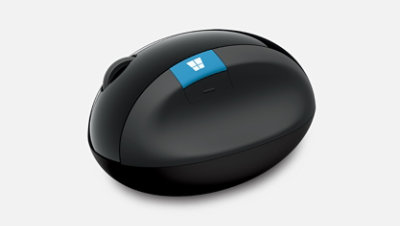
The Microsoft Sculpt Ergonomic Desktop is a legendary three-piece peripheral set featuring a split keyboard, a separate number pad, and a high-profile "ergonomic" mouse. Designed to promote a neutral wrist position, it utilizes a domed shape and a cushioned palm rest. While its tactile scissor-switch keys and negative-tilt riser are beloved by writers and developers, its reliance on a non-replaceable 2.4GHz USB-A dongle and the wear-prone fabric of the palm rest remain polarizing points of discussion in the tech community.
Pros
- Iconic split-key design reduces ulnar deviation and wrist strain.
- Deeply cushioned, integrated palm rest provides superior support.
- Separate number pad allows for flexible desk layouts and closer mouse placement.
- Tactile scissor-switch keys offer a satisfying, low-travel typing experience.
- Negative tilt stand promotes a more natural "downward" wrist angle.
Cons
- Proprietary 2.4GHz USB receiver is non-replaceable; if lost or broken, the set is useless.
- Fixed fabric palm rest is difficult to clean and prone to peeling over years of use.
- Glossy "piano black" accents are magnets for fingerprints and micro-scratches.
- Lack of Bluetooth connectivity limits use with tablets and modern thin-and-light laptops.
- Mouse "back" button and scroll wheel are known for reliability issues over long-term use.
The Microsoft Sculpt Ergonomic Desktop is a legendary three-piece peripheral set featuring a split keyboard, a separate number pad, and a high-profile "ergonomic" mouse. Designed to promote a neutral wrist position, it utilizes a domed shape and a cushioned palm rest. While its tactile scissor-switch keys and negative-tilt riser are beloved by writers and developers, its reliance on a non-replaceable 2.4GHz USB-A dongle and the wear-prone fabric of the palm rest remain polarizing points of discussion in the tech community.
Design and build quality
The Microsoft Sculpt Ergonomic Desktop, often affectionately called the "Manta Ray" due to its sweeping curves and central cutout, remains one of the most visually distinct peripherals on the market. The design philosophy focuses on the "Natural" arc, mimicking the curved fingertips and the natural splay of the hands. Unlike traditional flat keyboards, the Sculpt is domed, forcing the wrists into a more neutral position. The build quality feels premium yet functional, featuring a mix of matte keys and a high-gloss frame. The standout feature is the integrated palm rest, which uses a dense foam covered in a breathable fabric. While the keyboard is light, it feels sturdy on the desk, especially when using the magnetic riser that attaches to the front to create a "negative tilt"
Performance in real use
In practice, the Sculpt offers a unique typing rhythm. It utilizes scissor-switches, providing a snappy, tactile response with a short travel distance similar to high-end laptops. This makes it significantly quieter than mechanical alternatives, a boon for open-office workers. The split layout, while daunting to newcomers, becomes intuitive within a few days for touch-typists
Ease of use
Setting up the Sculpt is a literal "plug and play" affair, provided you have a USB-A port. There is no software required for basic functionality, though Microsoft’s Mouse and Keyboard Center allows for minor remapping
Reliability
Reliability is the Sculpt's most contentious chapter. The hardware itself is robust, but the 2.4GHz USB dongle is a single point of failure
Long term ownership feedback
Long-term owners often describe a "love-hate" relationship. The comfort is so addictive that many users report being unable to return to traditional keyboards.
| Specification | Details |
|---|---|
| Key Switch Type | Scissor switches with chiclet-style keycaps [^1_5][^1_1] |
| Connectivity | Wireless 2.4GHz via USB receiver [^1_8][^1_1] |
| Battery Type | 2× AAA batteries (keyboard), CR2430 (numeric keypad) [^1_11][^1_1] |
| Layout | Split ergonomic with reverse incline and dome design [^1_1][^1_7] |
| Palm Rest | Integrated cushioned foam palm rest [^1_8][^1_1] |
| Numeric Keypad | Detachable wireless numeric keypad included [^1_5][^1_2] |
| Function Keys | Media controls with physical toggle switch [^1_11][^1_1] |
| Backlighting | None [^1_1] |
| OS Compatibility | Windows (full), macOS/Linux (limited) [^1_1][^1_6] |
| Software | Microsoft Mouse and Keyboard Center (Windows only) [^1_1][^1_6] |
Buy
- You suffer from Repetitive Strain Injury (RSI) or carpal tunnel symptoms and need immediate relief.
- You prefer the short-travel, "chiclet" feel of laptop keys over loud mechanical switches.
- You want a cleaner desk aesthetic with a separate numpad that can be tucked away when not in use.
- You work in a shared office environment where a quiet but tactile keyboard is a necessity.
- You are a professional writer or coder who spends 8+ hours a day at a terminal.
Skip
- You frequently switch between multiple devices and require multi-device Bluetooth pairing.
- You are "tough" on gear; the non-replaceable dongle makes this a risky long-term investment.
- You prefer a mechanical typing experience with customizable keycaps and switches.
- You have a small desk where the large, non-detachable palm rest takes up too much real estate.
- You require a backlit keyboard for working in low-light or dark environments.
Critic Reviews
No reviews yet.
User Reviews
No reviews yet.