
Microsoft Surface Laptop Studio 2
The Surface Laptop Studio 2 doubles down on Microsoft's unique convertible design with upgraded performance and refined features, but its premium pricing and missing stylus remain significant trade-offs for creative professionals seeking versatility without compromise.
Updated January 28, 2026
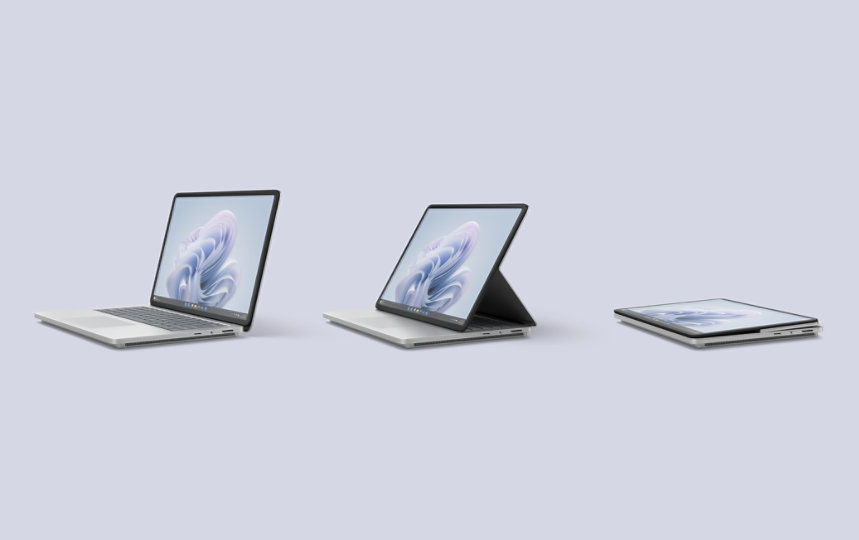
Microsoft's Surface Laptop Studio 2 represents a refined evolution of the company's distinctive convertible laptop, pairing 13th Gen Intel processors with Nvidia RTX 40-series graphics in a chassis designed to transform between laptop, easel, and tablet modes. The device targets creative professionals and power users who need a single machine capable of handling design work, gaming, and traditional productivity tasks. While the hardware delivers competitive performance and the 120Hz touchscreen impresses, the Studio 2 faces stiff competition from both Windows alternatives and Apple's MacBook Pro lineup. The absence of an included Surface Slim Pen 2 stylus at prices starting near $2,000 undermines the device's tablet functionality, and battery life falls short of Microsoft's claims. For users who genuinely need the unique convertible form factor and can justify the premium, the Studio 2 delivers a capable all-in-one solution, but most buyers may find better value elsewhere.[1][2][3][4][5]
Pros
- Unique convertible hinge design allows seamless transitions between laptop, easel, and tablet modes for diverse workflows
- Substantial performance upgrade with 13th Gen Intel Core i7 processors and Nvidia RTX 4050/4060 GPUs handles demanding creative applications and gaming
- Bright 120Hz PixelSense display with dynamic refresh rate, HDR400 support, and excellent color accuracy (101.8% sRGB, 495 nits brightness)
- World-class haptic touchpad with Adaptive Touch mode for improved accessibility, making it the first laptop to support this feature
- Enhanced port selection including USB-A 3.1 and microSD card reader alongside dual Thunderbolt 4 ports addresses connectivity needs
Cons
- Expensive pricing starting at $1,999 without including the essential Surface Slim Pen 2 stylus ($129 extra) limits accessibility
- Battery life falls significantly short of advertised claims, delivering 9-10 hours instead of the promised 16-19 hours
- Heavier and bulkier than competitors at 4.18-4.37 pounds, making it less portable than similarly priced alternatives
- Long-term reliability concerns including keyboard key corrosion, rubber feet peeling, and occasional thermal throttling issues reported by users
- Cannot match MacBook Pro performance benchmarks despite Microsoft's competitive positioning during launch
Microsoft's Surface Laptop Studio 2 represents a refined evolution of the company's distinctive convertible laptop, pairing 13th Gen Intel processors with Nvidia RTX 40-series graphics in a chassis designed to transform between laptop, easel, and tablet modes. The device targets creative professionals and power users who need a single machine capable of handling design work, gaming, and traditional productivity tasks. While the hardware delivers competitive performance and the 120Hz touchscreen impresses, the Studio 2 faces stiff competition from both Windows alternatives and Apple's MacBook Pro lineup. The absence of an included Surface Slim Pen 2 stylus at prices starting near $2,000 undermines the device's tablet functionality, and battery life falls short of Microsoft's claims. For users who genuinely need the unique convertible form factor and can justify the premium, the Studio 2 delivers a capable all-in-one solution, but most buyers may find better value elsewhere.[1][2][3][4][5]
Design and Build Quality
The Surface Laptop Studio 2 maintains Microsoft's distinctive convertible form factor while upgrading to a full aluminum chassis that replaces the previous magnesium-aluminum hybrid construction. At 4.18 to 4.37 pounds depending on configuration, the device carries noticeable heft compared to the 3.5-pound 14-inch MacBook Pro, though the weight serves a purpose in supporting the unique hinge mechanism. The signature feature remains the sliding hinged display that allows three distinct positions: traditional clamshell for typing, easel mode with the screen pulled forward over the keyboard, and tablet mode with the display laid flat. The mechanism requires a gentle technique - placing one hand on the upper display while pulling the bottom forward - but operates smoothly once mastered.[1][2]
The 14.4-inch display sits within thick bezels that house the 1080p webcam with Windows Hello IR camera for facial authentication. A thoughtful magnetic charging lip underneath the front edge secures and charges the separately sold Surface Slim Pen 2, though critics consistently note Microsoft's decision to exclude the $129 stylus undermines the device's core functionality. The footprint measures 12.72 x 9.06 x 0.86 inches with a base smaller than the lid, creating the stylus storage lip. The keyboard features chiclet-style keys with generous spacing that promotes comfortable typing, though the cramped arrow keys frustrate users with larger fingers. Long-term owner reports reveal concerning durability issues including keyboard key corrosion, rubber feet deterioration, and occasional fan grinding noises after 18-24 months of use.[8][3][5][1][2]
Performance in Real Use
Microsoft equipped the Surface Laptop Studio 2 with 13th Gen Intel Core i7-13700H or i7-13800H processors paired with up to 64GB LPDDR5x RAM and Nvidia GeForce RTX 4050 or 4060 GPUs for consumer models. The configuration delivers Geekbench 5 scores of 1,851 single-core and 12,779 multi-core, placing it competitively among Windows laptops while falling short of Apple's M2 Max MacBook Pro at 1,926 and 14,939 respectively. In real-world creative workflows, the device completed Tom's Guide's video editing test in 5 minutes 11 seconds compared to the MacBook Pro's 4 minutes 6 seconds. PCMark 10 testing showed the Studio 2 matching or exceeding premium competitors like the Razer Blade 16, demonstrating substantial capability for multitasking and professional applications.[10][18][3][1]
The dedicated Intel Gen3 Movidius 3700VC AI accelerator handles machine learning tasks including Windows Studio Effects for webcam background blur and lighting adjustments, though current functionality remains limited to these specific features. Gaming performance exceeds expectations for a convertible workstation, with the RTX 4060 configuration delivering 67 fps in Borderlands 3 and 82 fps in Shadow of the Tomb Raider at 1080p high settings. More demanding titles like Cyberpunk 2077 run at 25-30 fps with DLSS upscaling enabled, making the device viable for casual gaming though dedicated gaming laptops significantly outperform it. Users report smooth multitasking with multiple Chrome windows and 10+ tabs, with the 64GB RAM configuration handling professional workloads without audible fan noise under typical productivity tasks.[3][1][2]
Ease of Use
The Windows 11 interface benefits from the 3:2 aspect ratio display that provides extra vertical space for spreadsheets, documents, and web browsing. The 120Hz dynamic refresh rate makes scrolling and stylus input feel responsive, though this contributes to reduced battery life. Microsoft's Surface app serves as the control center for device-specific features including Adaptive Touch mode, Windows Studio Effects, and stylus pressure sensitivity adjustments. The haptic touchpad represents a standout feature with customizable feedback and world-class tracking precision that rivals Apple's Force Touch trackpads. Adaptive Touch mode makes the Studio 2 the only laptop currently supporting alternative input methods, allowing users to control the cursor by dragging wrists or elbows across the touchpad rather than requiring finger precision.[6][3][4][1][2]
The convertible form factor transitions smoothly between modes for different tasks, with easel mode proving particularly useful for video conferences, presentations, and stylus-based work at a natural drawing angle. Tablet mode functions adequately for digital art and note-taking with the Surface Slim Pen 2, though the 4+ pound weight makes handheld use uncomfortable for extended periods. Port selection improved significantly with the addition of USB-A 3.1 and microSD card reader alongside dual Thunderbolt 4/USB-C ports, addressing previous connectivity limitations. The absence of HDMI out requires a dongle for external displays, a curious omission given the device's professional positioning. The quad Omnisonic speakers with Dolby Atmos deliver impressive volume and clarity with minimal bass response, making the device suitable for media consumption without external speakers.[4][1][2]
Reliability
Professional reviews conducted over weeks of testing found the Surface Laptop Studio 2 generally stable for typical creative workflows, though thermal management becomes a concern during sustained high-performance tasks. The device remains cool and quiet during productivity work, web browsing, and light creative tasks with temperatures staying below 90 degrees Fahrenheit on external surfaces. Gaming or running graphical benchmarks for 15+ minutes pushes external temperatures to 109 degrees on the underside, making lap use uncomfortable and necessitating desk placement. Some users report thermal throttling that severely limits performance, with Windows updates occasionally failing to install correctly on the Studio 2 hardware.[7][1][2]
Consumer reports from long-term owners paint a more concerning picture after 18-24 months of ownership. Multiple users document keyboard key corrosion despite no liquid exposure, rubber feet adhesive failure, and fan bearing wear producing grinding noises. Reddit discussions reveal a subset of users experiencing performance degradation over time potentially related to thermal paste deterioration or SSD wear from the drive approaching capacity. The internal SSD proves difficult to upgrade due to Microsoft's chassis design, limiting repair and expansion options. Battery health degradation appears typical for the category with no widespread reports of accelerated capacity loss. Microsoft's software updates occasionally create compatibility issues specific to Surface hardware, though patches typically arrive within a few months. The device lacks the proven long-term reliability track record of Apple's MacBook Pro line or enterprise laptops from Dell and Lenovo, making extended warranty consideration advisable for professional users.[7][8][9]
Use Cases
The Surface Laptop Studio 2 targets creative professionals who regularly transition between digital illustration, photo editing, video production, and traditional office productivity. Graphic designers and digital artists benefit from the easel mode positioning that provides a natural drawing angle when paired with the Surface Slim Pen 2, with Adobe Creative Suite applications running smoothly across Photoshop, Illustrator, and Premiere Pro. The device scored 1,195 in PugetBench Photoshop testing and 594 in Premiere Pro, indicating solid capability for professional creative work while trailing purpose-built workstations. Video editors working with 1080p and 4K footage report satisfactory performance with the RTX 4060 configuration, though rendering times exceed Apple's M2 Max MacBook Pro.[8][3][1][2]
Architecture and engineering professionals using CAD applications benefit from the Nvidia RTX 2000 Ada enterprise option that provides certified drivers and 8GB GDDR6 memory. The 14.4-inch 2400 x 1600 resolution provides sufficient screen space for technical drawings, though the 72.1% DCI-P3 color gamut coverage falls short of specialized color-critical displays. Educators and students report excellent experiences using the device for lesson planning, video creation, presentation delivery in easel mode, and note-taking with stylus input. Business travelers appreciate the versatility of carrying a single device for presentations, note-taking during meetings, and entertainment on flights, though the 4.2+ pound weight impacts portability compared to ultrabooks. Casual gamers find the RTX GPU configurations provide adequate performance for popular titles at medium-high settings, with the device effectively replacing a separate gaming laptop for light to moderate gaming needs.[3][1][2][9]
Long-Term Ownership Feedback
Early adopters from the 2023 launch report generally positive experiences through the first year of ownership, praising the device's versatility and performance for mixed-use workflows. Battery life concerns emerge consistently, with real-world usage delivering 6-8 hours under moderate productivity loads rather than Microsoft's claimed 16-19 hours. The discrepancy forces users to carry the charger for full workdays, though the rapid charging capability recovers roughly 50% capacity in 30 minutes. Weight becomes a consideration for users frequently traveling, with multiple owners noting the device feels noticeably heavier than competing ultrabooks and even some 15-inch alternatives.[17][4][1][2][9]
Reliability issues emerge primarily after 18-24 months, with a notable subset of users experiencing hardware deterioration including keyboard problems, adhesive failures on rubber components, and mechanical fan bearing issues. The aluminum chassis shows good resistance to cosmetic damage from normal use, maintaining appearance better than the previous magnesium construction. Software stability remains generally solid with occasional Windows update incompatibilities specific to Surface hardware requiring Microsoft patches. The difficulty of internal component access makes RAM upgrades impossible and SSD replacement challenging, limiting the device's lifespan for users whose needs evolve. The Surface Slim Pen 2 stylus maintains consistent performance over time with the magnetic charging system working reliably, though the separate purchase requirement continues to frustrate owners. Users committed to the Windows ecosystem and needing genuine convertible functionality report satisfaction despite trade-offs, while those seeking pure performance or battery longevity express regret about not choosing alternatives.[7][8][5][1][2][9]
| Specification | Details |
|---|---|
| Display | 14.4-inch PixelSense touchscreen, 2400 x 1600 resolution, 3:2 aspect ratio, 120Hz refresh rate, HDR400, Dolby Vision support [3][1] |
| Processor | Intel Core i7-13700H or i7-13800H (13th Gen Raptor Lake) with Intel Gen3 Movidius 3700VC AI accelerator [1][3] |
| Graphics | Integrated Intel Iris Xe, or Nvidia GeForce RTX 4050/4060 (consumer), or Nvidia RTX 2000 Ada Generation (enterprise) [3][10] |
| Memory | 16GB, 32GB, or 64GB LPDDR5x RAM [3][1] |
| Storage | 512GB, 1TB, or 2TB Gen 4 NVMe SSD [3][1] |
| Ports | 2x Thunderbolt 4/USB-C, 1x USB-A 3.1, microSD card reader, 3.5mm headphone jack, Surface Connect charging port [1][1] |
| Camera | 1080p Surface Studio Camera with Windows Hello IR camera for facial authentication [1] |
| Audio | Quad Omnisonic speakers with Dolby Atmos support [1] |
| Dimensions | 12.72 x 9.06 x 0.86 inches [1] |
| Weight | 4.18 lbs (integrated graphics) to 4.37 lbs (discrete GPU) [1] |
| Battery | Rated up to 16-19 hours (typical real-world: 9-10 hours) [2][4] |
| Materials | Aluminum chassis construction replacing previous magnesium-aluminum hybrid [1] |
| Operating System | Windows 11 [10] |
Buy
- You regularly switch between digital drawing, note-taking, video editing, and traditional laptop work requiring a versatile form factor[1][2]
- You need Windows-specific software with stylus input and powerful discrete graphics in a single convertible device[3]
- You value the unique easel mode for presentations, video conferencing, or creative review sessions with clients[4][2]
- You require the Adaptive Touch accessibility features for alternative input methods beyond traditional trackpad use[1]
- You want a capable gaming machine that doubles as a professional creative workstation without carrying separate devices[9][2]
Skip
- You prioritize battery life and portability over convertible functionality for all-day mobile productivity[5][2]
- You need the absolute best performance per dollar and can achieve more with a dedicated laptop or tablet setup[2]
- You expect an included stylus for digital art and note-taking at this premium price point[5][2]
- You prefer lighter, thinner ultrabooks and don't require the tablet or easel modes for your workflow[2]
- You've experienced previous Surface reliability issues and want a device with proven long-term durability[8][7]
Critic Reviews
No reviews yet.
User Reviews
No reviews yet.