
Samsung Galaxy Chromebook Plus
Record-breaking thinness meets stunning AMOLED visuals and reliable battery life, though premium positioning challenges traditional Chromebook value expectations.
Updated January 28, 2026
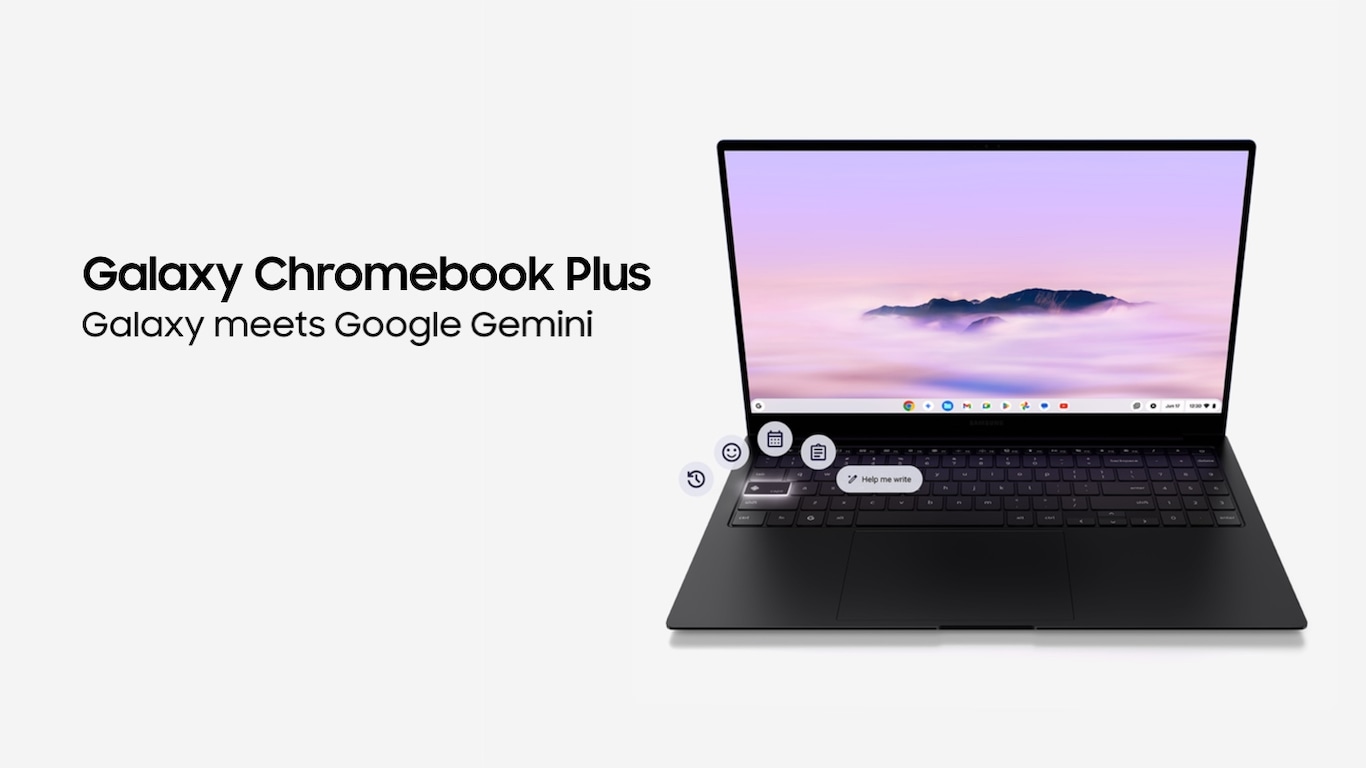
The Samsung Galaxy Chromebook Plus represents a significant evolution in ChromeOS hardware, combining ultraportable design with premium materials and display technology. At just 11.8mm thick and weighing 2.45 pounds, this 15.6-inch Chromebook claims the title of thinnest and lightest in its category. Samsung equips the device with a stunning AMOLED display, Intel Core 3 processor, and dedicated Google AI integration through a new Quick Insert key. Professional reviewers consistently praise its build quality and performance, with PCMag awarding it an Editors' Choice recognition for premium clamshell Chromebooks. The device targets users seeking Windows ultrabook-level construction without leaving the ChromeOS ecosystem, though its premium positioning places it well above typical Chromebook pricing.[1][2][3][4][5][6][7]
Pros
- Ultra-thin 11.8mm profile and exceptionally light 2.45-pound weight enable effortless portability
- Stunning 15.6-inch AMOLED display delivers deep blacks, vibrant colors, and 108.5% DCI-P3 coverage
- Battery life exceeds 11 hours in testing, surpassing most Chromebook competitors
- Responsive Intel Core 3 100U processor handles multitasking smoothly with 8GB RAM
- Premium metal construction and comprehensive port selection including HDMI and USB-C
Cons
- Considerably more expensive than standard Chromebooks at typical $699 retail positioning
- Lacks touchscreen capability found on similarly priced 2-in-1 Chromebook alternatives
- Speakers deliver flat, tinny audio quality with weak bass response
- Wide 13.9-inch footprint reduces portability despite thin profile
- Some users report inconsistent USB-C hub compatibility and connectivity issues
The Samsung Galaxy Chromebook Plus represents a significant evolution in ChromeOS hardware, combining ultraportable design with premium materials and display technology. At just 11.8mm thick and weighing 2.45 pounds, this 15.6-inch Chromebook claims the title of thinnest and lightest in its category. Samsung equips the device with a stunning AMOLED display, Intel Core 3 processor, and dedicated Google AI integration through a new Quick Insert key. Professional reviewers consistently praise its build quality and performance, with PCMag awarding it an Editors' Choice recognition for premium clamshell Chromebooks. The device targets users seeking Windows ultrabook-level construction without leaving the ChromeOS ecosystem, though its premium positioning places it well above typical Chromebook pricing.[1][2][3][4][5][6][7]
Design and Build Quality
The Samsung Galaxy Chromebook Plus establishes new benchmarks for Chromebook portability with its record-breaking 11.8mm thickness and 2.45-pound weight. Samsung constructs the chassis from premium metal finished in Neptune Blue, delivering a tactile experience that rivals Windows ultrabooks. The minimalist design philosophy extends throughout, with smooth matte-like surfaces and restrained branding that emphasizes functionality over decoration.[2][1][4]
Professional reviewers consistently note the device feels substantially more premium than typical Chromebook offerings. The metal construction provides rigidity while maintaining exceptional thinness, though some users report slight display wobble during typing due to the thin lid design. The 15.6-inch footprint creates a wider profile at 13.9 inches, which somewhat counterbalances the ultra-thin benefits for bag portability.[6][1][4][10]
Port selection demonstrates Samsung's attention to practical connectivity needs. The Galaxy Chromebook Plus includes two USB-C ports for charging and data, one USB-A 3.2 port for legacy devices, full-size HDMI for external displays, a microSD card slot for expandable storage, and a 3.5mm audio jack. This comprehensive array eliminates dongle dependency for most common workflows, earning praise from business users.[3][9][1][10]
The backlit keyboard integrates a dedicated Quick Insert key for rapid access to Google AI features, representing ChromeOS's evolving integration of generative AI tools. Keyboard feedback receives mixed assessments, with most users finding the typing experience comfortable though requiring adjustment for the integrated number pad layout. Some reviewers note the expanded keyboard geography challenges users accustomed to more compact 13-inch laptop layouts.[3][1][10]
Performance in Real Use
The Intel Core 3 100U processor paired with 8GB LPDDR5X RAM delivers performance that exceeds typical Chromebook expectations. In Geekbench 6 testing, the device scores 1,902 single-core and 6,015 multicore, positioning it competitively against premium Chromebook alternatives. Real-world multitasking scenarios demonstrate the hardware's capability, with reviewers successfully managing 20+ Chrome tabs including video playback without noticeable lag.[5][6][1]
The 256GB UFS storage provides significantly faster read/write speeds compared to eMMC implementations common in budget Chromebooks. This manifests in near-instantaneous cold boot times and rapid application launches. Web browsing performance impresses in standardized testing, with the Galaxy Chromebook Plus scoring 268.37 on Jetstream 2 compared to the Chromebook category average of 211.33.[6][1]
ChromeOS optimization enables this relatively modest hardware specification to deliver smooth performance for typical productivity workloads including Google Workspace applications, web-based software, and Android app usage from the Play Store. Users report consistent responsiveness during document editing, spreadsheet work, and video conferencing. The active cooling system maintains thermal performance, though fan noise becomes noticeable under sustained loads.[3][5][4][10]
Gaming capabilities remain limited to casual Android titles and browser-based games, with the integrated Intel graphics unsuitable for demanding 3D applications. This aligns with ChromeOS positioning as a productivity and content consumption platform rather than creative workstation or gaming device.[1][4]
Ease of Use
ChromeOS delivers its characteristic simplicity advantage, providing seamless integration with Google's ecosystem from initial setup. Users report immediate recognition of connected Google devices including Pixel phones and earbuds, enabling cross-device features like text message access and photo synchronization without configuration. This ecosystem cohesion particularly benefits users already invested in Google services including Gmail, Google Photos, and Google Drive.[5][1]
The new Quick Insert key represents ChromeOS's most significant interface evolution, providing single-press access to emoji insertion, GIF libraries, links, and most importantly Google Gemini AI features. The Help Me Write function generates contextual text based on prompts, streamlining email composition and document creation. Whether users adopt this workflow depends on individual preferences, but the dedicated hardware button makes AI features more discoverable than software-only implementations.[3][1]
The 15.6-inch AMOLED display earns universal acclaim for its visual quality. Deep OLED blacks, vibrant color reproduction covering 108.5% of DCI-P3 gamut, and 377 nits average brightness create an immersive viewing experience. Content consumption for streaming video and web browsing benefits substantially from the display technology, with reviewers noting true-to-life colors and exceptional contrast. The 1920x1080 resolution provides adequate sharpness for the screen size, though pixel density falls short of higher-resolution Windows alternatives.[3][6][4][1]
Touchpad performance meets professional standards with a large 5.2 x 3.5-inch surface area and responsive tracking. Some users report palm rejection issues during typing, particularly with the number pad integration affecting trackpad placement. The 1080p webcam delivers serviceable video quality for conferencing, though low-light performance remains mediocre.[1][10]
Reliability
Long-term reliability assessments remain limited given the device's late 2024 launch, though early user reports indicate generally stable operation. ChromeOS's architecture provides inherent security advantages, with Google claiming Chromebooks have never experienced virus infections due to built-in protection and automatic update delivery. The Titan C2 security chip adds hardware-level security enforcement.[17][11][10]
Some users report inconsistent USB-C hub compatibility, with intermittent failures to detect external displays or charging accessories. This connectivity inconsistency represents the most significant reliability concern in user feedback, though its prevalence across the user base remains unclear. Samsung's one-year parts and labor warranty provides standard manufacturer coverage.[8][1]
Build quality inspires confidence in physical durability, with premium metal construction resisting flex and maintaining structural integrity. The thin display lid generates some user concerns about long-term hinge durability, particularly given reports of wobble during typing. Professional reviewers note no immediate durability concerns during testing periods, but extended ownership will determine whether the ultra-thin construction compromises longevity.[6][4][10]
Battery degradation over time represents a consideration for any laptop, though ChromeOS's lighter system resource demands typically extend battery health compared to Windows equivalents. The 68Wh capacity provides substantial energy storage for the device category.[5][1]
Use Cases
The Galaxy Chromebook Plus excels for users requiring maximum portability with large-screen productivity. Students and business travelers benefit from the lightweight construction that enables effortless transport between locations without sacrificing the visual real estate of a 15.6-inch display. The device serves business users performing web-based workflows, email management, video conferencing, and cloud-based document collaboration.[9][15][7][2][10]
Content consumption represents a standout use case, with the AMOLED display technology delivering exceptional video streaming quality. Users report enjoying the visual experience for entertainment alongside productivity tasks. The 11+ hour battery life supports all-day usage patterns without charging access, whether in educational environments, coffee shops, or during travel.[3][4][5][1][10]
The device suits users comfortable within Google's ecosystem who can accomplish their computing needs through web applications, Android apps, and Google Workspace tools. Professionals requiring Windows-specific software, advanced creative applications like Adobe Creative Suite, or local file-heavy workflows will find ChromeOS limitations restrictive. The lack of touchscreen functionality reduces appeal for users prioritizing pen input or 2-in-1 tablet modes.[4][3][5]
ChromeOS's inherent simplicity benefits users seeking straightforward computing without Windows complexity, making it suitable for family members prioritizing ease of use over advanced customization. The integration of Gemini Advanced for 12 months adds value for users exploring AI-assisted productivity features.[3][1]
Long-Term Ownership Feedback
Early adopter feedback indicates high satisfaction levels among users whose needs align with ChromeOS capabilities. Best Buy customer reviews show strong ratings with users reporting consistent daily business use without performance degradation. The OLED display quality continues to impress during extended ownership, with users noting the visual experience remains a highlight after months of use.[11][10]
Battery life meets or exceeds expectations in real-world usage, with multiple users confirming all-day operation aligns with Samsung's claims for typical productivity workloads. Some users note battery performance varies significantly based on usage intensity, with video conferencing and high brightness settings reducing runtime substantially. Engadget's extended testing reports 6.5 to 8 hours under concentrated use patterns, falling short of Samsung's 13-hour maximum claim but remaining competitive for the category.[13][5][10]
The keyboard and trackpad comfort levels receive positive long-term assessments, with users appreciating the backlit keys and responsive typing experience. The integrated number pad proves useful for users entering numerical data, though some continue to experience occasional palm rejection issues with trackpad placement.[10]
Audio quality represents the most consistent long-term complaint, with users confirming the speakers lack depth and bass response for media consumption. Owners who prioritize audio invest in external headphones or Bluetooth speakers to compensate. The device's premium positioning creates expectations that the audio hardware fails to meet.[4][1]
ChromeOS update delivery remains seamless and automatic, with users reporting no maintenance burden for security patches or feature updates. The simplified operating system reduces troubleshooting compared to Windows alternatives, contributing to positive ownership experiences for less technical users.[17][1]
| Specification | Details |
|---|---|
| Display | 15.6-inch FHD (1920 x 1080) AMOLED, 60Hz refresh rate, non-touch [3][1] |
| Processor | Intel Core 3 100U (6-core, 1.4GHz to 5GHz) [9][1] |
| Memory | 8GB LPDDR5X [3][1] |
| Storage | 256GB UFS (Universal Flash Storage) [3][6] |
| Graphics | Intel Integrated Graphics [1] |
| Battery | 68Wh, up to 13 hours claimed [3][1] |
| Dimensions | 13.9 x 8.9 x 0.47 inches (353 x 226 x 11.8mm) [3][1] |
| Weight | 2.45 pounds (1.17kg) [2][1] |
| Ports | 2x USB-C, 1x USB-A 3.2, HDMI, microSD, 3.5mm audio [3][1] |
| Webcam | 1080p FHD [1] |
| Keyboard | Backlit with dedicated Quick Insert key [10][3] |
| Operating System | ChromeOS with 12 months Gemini Advanced included [3] |
| Materials | Metal construction with Neptune Blue finish [1] |
Buy
- You require maximum portability in a large-screen laptop for frequent travel or commuting[2][7]
- AMOLED display quality matters for content consumption and color-accurate work[1][4]
- Extended battery life is essential for all-day use without charging access[5][1]
- You want premium build quality matching Windows ultrabooks within ChromeOS[6][4]
- Deep Google ecosystem integration and AI features align with your workflow needs[3][5]
Skip
- Budget constraints make sub-$400 Chromebooks more practical for basic computing needs[7][1]
- Touchscreen functionality or 2-in-1 convertibility is essential for your use case[4]
- Audio quality matters for media consumption without external speakers or headphones[1]
- Windows or MacOS software compatibility is required for specialized applications[4]
- You need more rugged construction for demanding environments beyond office use[8]
Critic Reviews
No reviews yet.
User Reviews
No reviews yet.